How long should a video be?
The frustrating answer is that there is no single number. A 17-second demonstration can feel complete, while a 17-second explanation can feel rushed. A two-minute story may hold attention because every part earns its place, while a 25-second clip may lose viewers because the opening never reaches the point.
Platform limits make the question even more confusing. YouTube Shorts can now run up to three minutes. Instagram lets creators record and edit Reels up to 20 minutes, but says Reels over three minutes will not be recommended to new audiences. TikTok provides several duration choices, and available options can differ between accounts, regions and product rollouts.
This guide separates the maximum length a platform accepts from the length that is likely to work for a particular idea. It also shows how to use your own retention data instead of treating a generic benchmark as a rule.
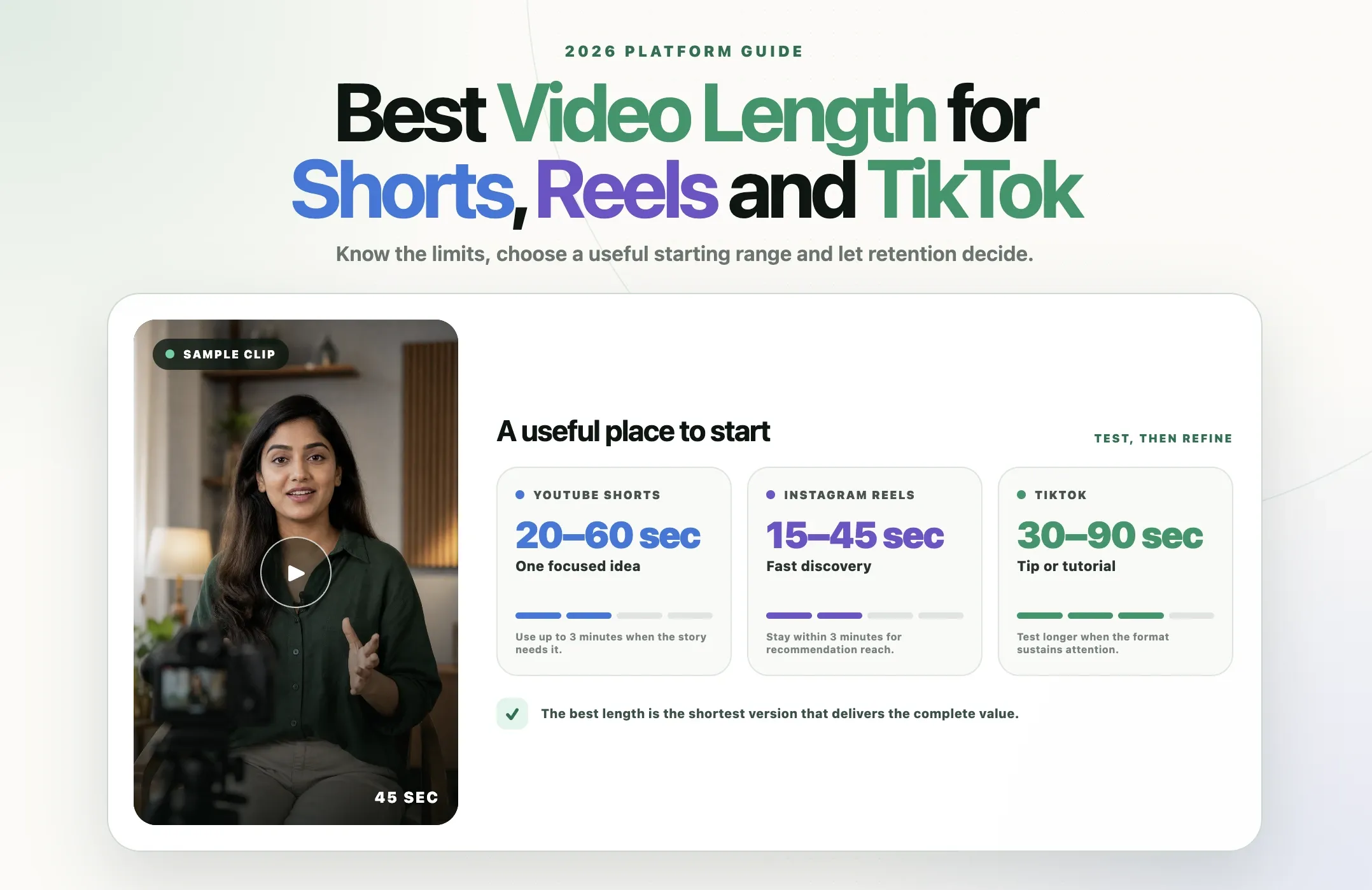
Quick answer: For a first test, use 15 to 30 seconds for one visual payoff, 30 to 60 seconds for one clear answer, 60 to 90 seconds for a demonstration or structured explanation, and up to three minutes when the story genuinely needs more context. These are testing ranges, not ranking factors. Keep the video only as long as it continues to deliver value.
Current video length limits at a glance
|
Format |
Current published limit or constraint |
Useful starting range |
|---|---|---|
|
YouTube Shorts |
Square or vertical videos up to 3 minutes can be categorized as Shorts. |
20 to 60 seconds for one idea; 60 to 180 seconds for a complete story, tutorial or explanation. |
|
Instagram Reels |
Instagram says creators can record and edit Reels up to 20 minutes. Reels over 3 minutes will not be recommended to new audiences. |
15 to 45 seconds for fast discovery; 30 to 90 seconds for education; up to 3 minutes when context improves the result. |
|
TikTok |
The creation screen offers multiple duration choices, but the maximum can vary by account, region, device and rollout. Check the app before production. |
15 to 45 seconds for quick concepts; 45 to 90 seconds for tutorials; 1 to 3 minutes for deeper stories worth finishing. |
|
Standard YouTube video |
Unverified accounts default to 15 minutes. Verified accounts can upload up to 12 hours or 256 GB, whichever is less. |
Use the exact length required by the subject. A focused answer may take 4 minutes; a detailed tutorial may deserve 20 minutes or more. |
Important: Organic posts, boosted posts and advertisements can have different limits. For example, Instagram may accept a long organic Reel while requiring a shorter Reel for boosting. Check the publishing workflow you will actually use.
Maximum length is not the same as ideal length
A platform limit answers a technical question: will the upload be accepted and classified in the intended format?
Ideal length answers an editorial question: how much time does this viewer need to receive the promised value without unnecessary delay?
The two numbers rarely match. A three-minute Shorts limit does not mean every Short should last three minutes. A 20-minute Reel limit does not mean a 20-minute Reel will reach new people. Maximum length is capacity, not a recommendation.
YouTube states this directly in its recommendation guidance: there is no universal optimal length for YouTube videos. It advises creators to use the precise length needed to deliver the information or entertainment value, avoid filler and use audience retention to understand what their viewers will watch.
That is the most defensible principle across every platform:
Make the video as short as possible, but as long as necessary.
How long can a YouTube Short be in 2026?
YouTube officially allows Shorts up to three minutes long. For standard channels, square or vertical videos uploaded on or after October 15, 2024 can be categorized as Shorts when they are no longer than three minutes.
That expanded limit creates three useful creative bands.
Under 30 seconds
This range fits one visual result, a reaction, a brief myth correction, a single product feature or a tightly edited moment. The opening must establish the subject immediately because there is little time to recover from a slow introduction. Reap’s guide to editing better Shorts, Reels and YouTube videos explains how to tighten hooks, pacing and payoff without adding unnecessary effects.
30 to 60 seconds
This is enough time for one complete answer with a premise, explanation and payoff. It works well for definitions, quick tutorials, podcast insights, customer objections and before-and-after examples.
60 seconds to 3 minutes
Use the expanded range when the additional time provides context, evidence or a satisfying story. Product walkthroughs, mini case studies, educational explanations and complete interview answers can benefit from more than one minute.
Do not overlook YouTube’s music rule for longer Shorts. A Short over one minute with an active Content ID claim can be blocked globally. YouTube says most songs in the Shorts Audio Library can be used for up to 90 seconds in a three-minute Short, while some tracks are limited to 60 or 30 seconds. Before editing around a song, review the copyright-safe workflow for adding music to YouTube, Reels and TikTok videos.
What length is best for YouTube Shorts?
Start with the time needed to complete one promise. Then use YouTube Studio to evaluate:
- Stayed to watch: How often viewers watched instead of swiping away
- Average view duration: The average time watched among engaged views
- Average percentage viewed: The average portion watched among engaged views
- Audience retention: Where viewers stayed, rewatched, skipped or left
- Outcome: Subscribers, comments, clicks or movement to a longer video
A 90-second Short can outperform a 25-second Short when it earns more meaningful watch time and satisfaction. The shorter video can still win when it delivers the same value with less effort.
If Shorts are a recurring part of the content plan, the guide to automating YouTube Shorts creation shows how clipping, captions, reframing and publishing can fit into one repeatable workflow.
How long can an Instagram Reel be in 2026?
Instagram says creators can record and edit Reels up to 20 minutes. The same help page includes an important discovery limitation: Reels over three minutes will not be recommended to new audiences.
That means there are two separate use cases.
Reels for discovery
If reaching non-followers is the main goal, stay within three minutes and start with a shorter version unless the concept clearly needs more time. Quick demonstrations, opinions, tips and behind-the-scenes moments often fit within 15 to 60 seconds. A deeper educational Reel may need 60 to 180 seconds.
Reels for an existing audience
A longer Reel can still serve followers who already care about the topic. Interviews, lessons, event excerpts and community updates may work beyond three minutes, even without the same recommendation opportunity. Decide whether depth for existing viewers is more important than discovery among new ones.
Boosted Reels and Reel ads
Paid distribution has separate specifications. Meta says a Reel must be shorter than 90 seconds to be boosted from Instagram. Reels ad creative created through Ads Manager can be up to 15 minutes. Music permissions also differ for ads, so do not assume an organic Reel is automatically ready to promote. If you cut ads from footage you already have, a video ad maker can produce the shorter version each placement needs.
What length is best for Instagram Reels?
Use Instagram’s own insights rather than views alone. Professional accounts can see:
- Total watch time
- Average watch time
- Accounts reached
- Views, including replays
- Likes, comments, saves and shares
- Follows attributed to the Reel
Average watch time reveals how much of the Reel people actually consumed. Shares and saves reveal whether the content was useful enough to travel or revisit. A short Reel with high completion but no meaningful action is not automatically better than a longer Reel that produces qualified follows or saves.
Length is only one part of the edit. If the first cut still needs trimming, captions or a stronger mobile workflow, compare the best Instagram video editors and Reels apps before choosing where to finish it.
How long can a TikTok video be in 2026?
TikTok has expanded beyond its original short clips and continues to test longer formats. Its current support area directs creators to choose a video length from the camera tools, but exact choices can vary across accounts, regions, devices and staged releases. Many accounts have access to recording choices up to 10 minutes, while some accounts may see different or longer options. Length is only half the spec; for frame size and aspect ratio, see our guide to TikTok dimensions.
For that reason, do not build a production plan around a maximum copied from an old article. Open the TikTok composer on the account that will publish the video and confirm the available duration before editing.
More importantly, longer TikToks are no longer an exception. TikTok reported in 2024 that its community spent 50% of its time watching videos longer than one minute. Buffer’s analysis of 1.1 million TikTok videos found that videos over 60 seconds received 43.2% more reach and 63.8% more watch time than videos between 30 and 60 seconds.
That does not prove every creator should make longer TikToks. It disproves the assumption that shorter always wins.
Useful TikTok starting ranges
- 15 to 30 seconds: Visual jokes, reactions, quick comparisons and single-step tips
- 30 to 60 seconds: One focused answer, short demonstration or opinion with supporting context
- 60 to 90 seconds: Tutorials, mini reviews, explainers and stronger narrative arcs
- 1 to 3 minutes: Storytelling, education, commentary and complete transformations
- Beyond 3 minutes: Use when audience expectation, search intent or narrative depth justifies the commitment
Longer TikToks need structure. State the subject quickly, create progress, remove repeated information and give the viewer a reason to continue after each section. The right tool should make those structural edits easier, so use the comparison of TikTok video editors and editing apps when choosing a mobile, desktop or AI workflow.
How long should a standard YouTube video be?
By default, a YouTube account can upload videos up to 15 minutes. After verification, the maximum becomes 12 hours or 256 GB, whichever is less. For the frame size, resolution, and bit rate to export at, see our YouTube video size guide.
Those are upload limits, not editorial targets. YouTube explicitly says there is no universal ideal video length. A useful search answer may take four minutes. A detailed software tutorial may take 18 minutes. An interview can justify an hour when viewers want the full conversation.
For standard YouTube videos, consider two watch-time measures together:
- Average percentage viewed shows how much of the video the audience watched relative to its total length.
- Average view duration shows the actual minutes watched.
YouTube says relative watch time is broadly more important for short videos, while absolute watch time is more important for longer videos. Both still matter. The goal is not to inflate duration. It is to sustain interest for the time the subject deserves.
Choose video length by the job it needs to do
|
Video job |
Starting length |
What must fit |
|---|---|---|
|
Visual hook or result |
10 to 20 seconds |
The result, one line of context and a clean ending |
|
Single tip |
20 to 40 seconds |
Problem, action and payoff |
|
Direct answer |
30 to 60 seconds |
Question, qualified answer and next step |
|
Product feature |
30 to 75 seconds |
Problem, feature in use and outcome |
|
Mini tutorial |
45 to 90 seconds |
Starting point, essential steps and final result |
|
Customer proof |
45 to 120 seconds |
Situation, evidence and credible outcome |
|
Educational explanation |
60 seconds to 3 minutes |
Premise, reasoning, example and conclusion |
|
Story or case study |
90 seconds to 5 minutes |
Setup, tension, change and resolution |
|
Deep tutorial or interview |
As long as needed |
Chapters, sustained value and a clear reason to continue |
These ranges are starting hypotheses. A specialist audience may willingly watch longer explanations. A cold audience in a fast feed may need the same point in half the time.
How to find the right length inside a long recording
Podcasts, webinars, interviews and presentations rarely arrive in clean social-sized units. The best clip boundary is determined by meaning, not a timer. For long sources, AI video summarization can help surface important moments before a creator decides where each final clip should begin and end. For shows, a podcast clip maker can find those boundaries in a full episode for you to review.
Start at the first necessary sentence
Remove greetings, repeated setup and references that only make sense inside the full recording. Keep the first sentence that establishes the problem, claim or situation the viewer needs.
Preserve the minimum context
Shortening a clip should not change what the speaker meant. Keep relevant conditions, qualifications and evidence. A faster clip is not better if it becomes misleading.
End after the payoff
Do not cut immediately before the example, answer or conclusion. The clip should feel complete even when the viewer never sees the source recording.
Split real topic changes
If a speaker answers two distinct questions, make two clips. Combining them usually creates a weak middle and an unclear title.
Create different versions when the decision is uncertain
A 35-second cut can test the core claim. A 75-second cut can include the example. A two-minute cut can preserve the complete reasoning. Publish versions across appropriate platforms or test them at different times rather than arguing about one perfect duration before any data exists. When adapting the same source, follow the principles for repurposing video without turning it into a low-value repost.
Use retention data to improve the next video
Do not compare completion percentage without considering length. A 95% completion rate on a ten-second clip represents 9.5 seconds of average viewing. A 55% completion rate on a 90-second clip represents nearly 50 seconds. The second video may have created far more attention even with a lower completion percentage.
Review these signals together:
- Opening behavior: Did viewers choose to watch, or leave immediately?
- Average time watched: How many seconds or minutes did the video earn?
- Average percentage viewed: How much of the complete video did viewers consume?
- Retention shape: Where did attention remain stable, spike or fall?
- Replays: Was a moment useful, entertaining or unclear enough to watch again?
- Meaningful actions: Did viewers save, share, follow, click or continue to another video?
A retention dip does not always mean the whole video was too long. It may identify one repeated explanation, confusing transition or promotional interruption. Cut the weak section before cutting the valuable conclusion.
If search discovery is part of the goal, length is only one input. The video still needs a clear subject, accurate captions and metadata that matches the answer. Reap’s guide to short-form video SEO explains how those signals work together.
A simple video-length testing plan
Use a repeatable test instead of changing every variable at once.
- Choose one recurring content type, such as a podcast insight or product tutorial. Where available, you can group those episodes into a YouTube Shorts series.
- Create three duration bands, such as 20 to 35 seconds, 40 to 60 seconds and 75 to 120 seconds.
- Keep the topic quality, caption style, framing and publishing schedule reasonably consistent. If caption consistency is the weak point, compare caption apps for YouTube and short-form video.
- Publish enough examples in each band to reduce the effect of one unusually strong or weak topic.
- Compare watch time, retention, shares, saves, follows and the business outcome that matters.
- Inspect the retention curves and revise the structure, not only the duration.
The purpose is not to declare one permanent winning length. It is to learn which durations suit particular content types and audience situations.
Common video-length mistakes
Using the maximum as the target
A platform adding more capacity does not mean viewers asked for more filler. Use extra time only when it improves understanding, emotion or proof.
Cutting the context to stay under 60 seconds
Shorts, Reels and TikTok can all support ideas beyond one minute. Do not remove the sentence that makes the claim accurate merely to preserve an outdated limit.
Padding a YouTube video for watch time
YouTube recommends the precise length needed to deliver value. Repeated information and delayed payoffs create retention dips and dissatisfaction, even if the upload earns more possible minutes.
Comparing unrelated topics
A celebrity reaction and a technical tutorial will naturally produce different viewing patterns. Compare similar subjects, audiences and goals before attributing the result to length.
Looking only at completion rate
Completion favors shorter videos mathematically. Consider average watch duration and meaningful actions alongside the percentage viewed.
Making one identical cut for every platform
The core idea can remain consistent while the opening, context and ending change. A discovery-focused Reel, a search-focused Short and a TikTok story may benefit from different cuts of the same source. They may also need different framing; AI Auto Reframe can resize and reposition a source for vertical, square and landscape outputs.
How Reap can help create different video lengths
Reap’s AI video clipping tool can turn long podcasts, webinars, interviews, tutorials and other recordings into several candidate clips without forcing every idea into one fixed duration. If the workflow is new to you, start with the complete guide to turning long videos into short clips.
In the clipping workflow, creators can configure the clip length along with the orientation, captions, language, resolution and source timeframe. After generation, Reap’s text-based video editor supports transcript-based trimming, extending a clip when it ends too early, removing unwanted sections, adjusting captions and changing orientation.
A practical workflow is:
- Upload the long recording or paste a supported source link.
- Choose a clip-length range that matches the first platform and content goal.
- Generate more candidates than you plan to publish.
- Review whether each clip starts with enough context and ends after the payoff.
- Extend strong clips when the AI cut is too short, or trim repeated sections when it is too long.
- Reframe, caption and export the versions that fit each destination.
The same method can be adapted to the source. For an event recording, follow the complete workflow for turning one webinar into 10 or more short clips. For an episodic show, compare the best podcast clip generators and choose a process that preserves complete ideas.
Useful approach: Generate a shorter discovery version and a longer explanation from the same source moment. Let audience behavior decide which structure deserves repeating.
Video length checklist
- Confirm the current upload limit inside the destination platform.
- Decide whether the goal is discovery, explanation, conversion or community depth.
- Open with the first sentence the viewer actually needs.
- Keep enough context for the video to stand alone.
- Remove repeated meaning, not every natural pause.
- End after the promised payoff.
- Check separate requirements for organic posts, boosted posts and advertisements.
- Compare similar videos across consistent duration bands.
- Evaluate watch duration, percentage viewed, retention shape and meaningful actions together.
- Update the next edit based on where viewers left, not on a generic benchmark.
The best video length is earned, not selected
Platform limits tell you what is possible. Viewer behavior tells you what is useful.
Use 15 to 30 seconds when the complete value fits there. Use 60 to 90 seconds when the example makes the answer more credible. Use three minutes when the story needs setup, development and resolution. Use long-form YouTube when depth is the product.
The goal is not to make every video shorter. It is to remove every second that does not help the viewer understand, feel or act.
Start with a sensible duration band, publish, study retention and improve the structure. Your audience will give you a more reliable answer than any universal “ideal length” chart.
Length is only half of it. For the frame itself, use the correct Instagram Reels dimensions and aspect ratio.