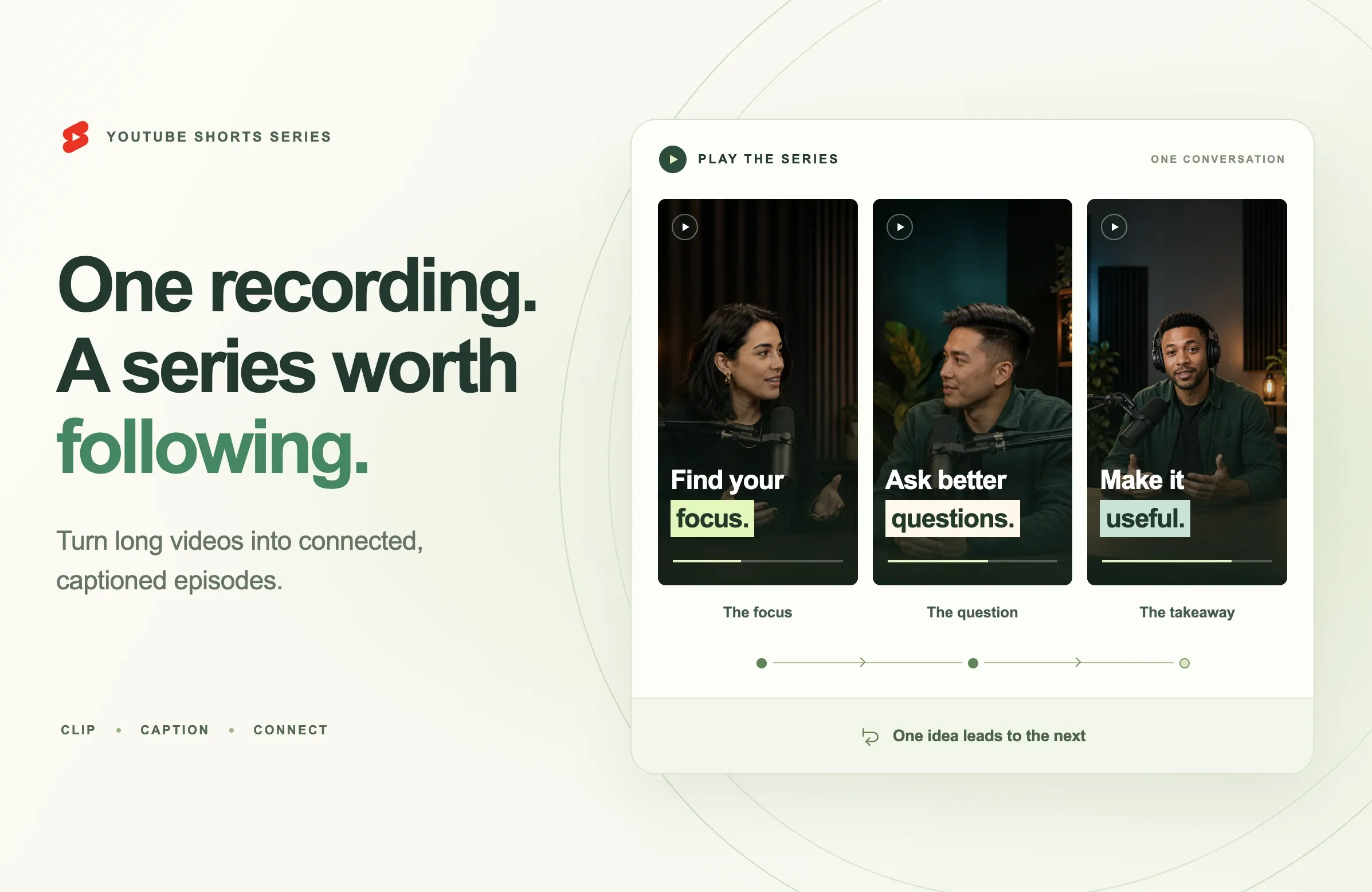
A long interview can contain several moments worth sharing. One explains a common mistake. Another shows how to fix it. A third answers the question someone would naturally ask next.
Those moments give you the material for a series. The editing challenge is making each clip useful on its own while giving the sequence a clear direction.
On September 23, 2026, YouTube announced Shorts series, introducing seasons, episodes and sequential playback for short-form content. Source: YouTube’s announcement.
For creators with podcasts, tutorials and recorded conversations, this creates a practical opportunity: review the footage you already have and identify ideas that belong together.
This guide explains the new feature, how to plan a YouTube Shorts series and how to use Reap to prepare connected episodes from a longer recording.
Quick Answer: What Is YouTube Shorts Series?
YouTube Shorts series is a newly announced way to organize Shorts into seasons and episodes, with custom thumbnails and sequential viewing across mobile, web and TV. Availability is rolling out. Source: YouTube’s feature overview.
To prepare a series from a long video, choose one audience problem, identify passages that answer related questions and edit each into a complete episode. Use Reap AI Clipping to prepare candidates, then review their meaning, captions and framing before export.
Arrange the finished episodes using the YouTube tools available to your account. Give every episode a specific purpose and a title that makes that purpose clear.
What Changed With YouTube’s New Shorts Series Feature?
Creators have been making recurring short-form content for years. The September announcement adds a product feature for presenting that content as episodes and seasons.
TeamYouTube describes organizing videos into shows in desktop Studio and a “watch series” button that takes viewers into sequential viewing. Source: TeamYouTube’s creator update.
For your content plan, the useful question is what the next episode adds. An interview may introduce a problem, explain a decision and demonstrate the result. Those passages can form a progression when each contains enough context to be understood separately.
Check availability before planning your launch
As of September 24, the official rollout wording differs: Google’s India announcement names YouTube Partner Program creators, while the main YouTube post uses broader wording. Check current guidance and the controls in your account before assuming access. Source: Google’s announcement.
You can prepare the videos, titles and intended sequence while checking availability. The editing workflow below does not depend on having the new controls today.
Which Long Videos Can Become a Useful Shorts Series?
Look for a recording that develops a subject through several distinct questions. The strongest candidate has enough substance for multiple episodes without repeating the same point.
Interviews and video podcasts
A focused interview often contains an explanation, an example and a follow-up question. Start by listing what the guest actually answers.
An interview with a small-business owner might cover choosing a service, finding the first customer and handling the first delivery mistake. That gives the series a recognizable audience and progression.
A wide-ranging conversation may require selecting one section. The guest’s unrelated comments on travel or equipment do not need to become episodes in the same series.
For the broader production process, see our guide to AI video editing for podcasters.
Tutorials and demonstrations
A tutorial can become a sequence when its stages offer useful individual lessons. A photography demonstration, for example, might explain light placement, background choice and a common exposure mistake.
Check that the visual evidence survives the shorter edit. If an episode teaches a setting change, viewers need to see the relevant control and its effect. A close crop of the presenter may leave out the most useful part.
Webinars and recorded lessons
A webinar can supply episodes around the questions attendees asked. Those questions can help identify where an explanation needs more context.
Review references to slides, earlier examples and downloadable materials. Keep or replace the essential visual context so the Short makes sense outside the original session.
Before committing, write a one-sentence description of every proposed episode. If several descriptions say the same thing, combine them or choose a narrower sequence.
Plan the Episodes Before You Start Clipping
A simple episode plan helps you decide which passages to keep and which cuts would weaken the explanation.
Define one promise for the series
Finish this sentence: “This series helps someone understand how to…”
“Launch a first interview podcast” gives you a practical direction. “Learn about content creation” leaves too many unrelated possibilities.
Keep the promise within the recording’s actual content. If the guest discusses interviewing but never covers equipment, avoid presenting the series as a complete recording setup guide.
Give each episode a different question
Choose related questions that move the audience forward. For a first-podcast series, you might cover the intended listener, the opening question, a follow-up technique and the choice of a promotional excerpt.
Three or four episodes are a manageable starting project. That is a planning suggestion, not a YouTube requirement or a target every recording must meet.
Make the sequence understandable from any entry point
Someone may encounter an individual clip without having seen the earlier episodes. State the subject early enough that the advice is understandable.
Compare “That’s why I stopped doing it” with an opening that includes what the speaker stopped doing and why. Moving the start point back a sentence may solve the problem. A short, accurate text introduction can also help.
Each episode should resolve its own question. The next episode can deepen the discussion without being required to understand the current answer.
How to Prepare a YouTube Shorts Series With Reap
Use the episode plan to guide selection, then review the generated candidates as an editor. The steps below combine documented Reap controls with a suggested production workflow.
Step 1: Add your source recording
Upload your video or use a supported source link. Reap’s clipping guide documents the source options and generation settings.
Keep your episode notes nearby. Record the passages that seem relevant, including any surrounding explanation needed to preserve the speaker’s meaning.
Step 2: Focus the clip selection
Choose the genre, orientation, caption style and target length. Use the processing timeframe for a relevant section and optional Clip Topics to guide selection toward your theme. Source: Reap clipping settings.
For the podcast example, your topics might be audience selection, interview questions and follow-up techniques. Review the results against the episode plan; a topic match alone does not establish that a passage gives a complete answer.
Step 3: Match candidates to episode questions
Assign each promising clip to one question. Listen to it without the rest of the recording and write down what a new viewer would learn.
If two clips cover the same point, keep the clearer explanation or use the second as an alternative edit. If a planned question has no useful passage, revise the plan instead of forcing an incomplete answer into it.
Step 4: Refine the opening and ending
Reap’s editor supports transcript-based start and end adjustments, cuts and word corrections. Source: Reap editor documentation.
Start where the subject becomes clear. Keep the example or condition that makes the advice accurate. End after the viewer receives the promised takeaway.
For this exercise, try a 30–60-second cut where the explanation fits naturally. Extend it when essential context needs more time. YouTube supports Shorts up to three minutes; its current guidance covers square or vertical uploads and applicable eligibility dates. Source: YouTube Shorts duration guidance.
Step 5: Review captions and framing
Correct names and technical terms, adjust caption timing and check the layout. Reap documents these controls in its editor guide.
Use a consistent caption treatment across the episodes, then inspect each clip individually. Text that works over a close-up may cover an important detail in a demonstration. Keep the face, gesture or visual evidence relevant to the explanation visible.
Preview at a small display size and listen through with sound. Check that the text is readable, the dialogue remains natural and the cut does not remove a necessary pause.
For more detail, see how to add captions to YouTube Shorts.
Step 6: Export the finished episodes
Use filenames that make the intended order easy to recognize, such as first-podcast-01-audience and first-podcast-02-opening-question. Keep a short note containing the title and takeaway for each file.
This workflow uses Reap to prepare the videos and YouTube to organize them. It does not assume Reap creates shows, seasons or episode assignments automatically.
Example: Turn One Interview Into Four Connected Episodes
Imagine a recorded conversation with a podcast host about planning a first interview. The following is an illustrative editing plan, not a campaign result or a guaranteed set of clips.
|
Episode |
Working title |
Passage to look for |
What to preserve |
|---|---|---|---|
|
1 |
Choose Who Your Podcast Is For |
The guest explains how a listener’s problem shapes the show |
The specific example that defines the intended listener |
|
2 |
Ask an Opening Question That Gets a Story |
The guest compares broad introductions with a focused question |
The example question and why it works |
|
3 |
Follow Up on the Detail That Matters |
The guest explains when to depart from prepared questions |
Enough of the previous answer to understand the follow-up |
|
4 |
Choose a Podcast Clip With a Complete Takeaway |
The guest describes how they select a promotional moment |
The selection criteria and the conclusion |
The order follows the work: decide who the conversation serves, prepare its opening, listen carefully and choose what to share afterward.
For episode two, an opening text line could be “Planning your first guest interview?” The clip then needs to show the actual question and explain its purpose. A title promising better questions should lead to a usable example.
Episode three may require a slightly longer edit because the follow-up depends on something the guest said earlier. Preserve that relationship. Cutting the setup solely to match the other episodes’ duration would make the lesson harder to follow.
Episode four can close the sequence with a practical decision: choose an excerpt that delivers something useful to a new listener. There is no need to repeat the whole interview’s introduction in every clip.
Before publishing, watch the four exports in order. Then watch each independently. The first pass checks progression; the second reveals missing context.
Publish With Consistent Titles and a Clear Episode Order
Take your episode plan into YouTube Studio and check the series controls available to your account. TeamYouTube identifies desktop Studio as the place to organize shows and add custom thumbnails. Follow the current interface and guidance as rollout continues. Source: TeamYouTube’s announcement.
Lead titles with the episode’s useful idea
“Ask a Better Opening Question” tells a new viewer more than “Podcast Tips, Part 2.” If you include episode numbering, keep the subject easy to identify.
Use a consistent naming pattern while making each promise distinct. Avoid giving several episodes nearly identical titles when they answer different questions.
Make the thumbnail match the episode
Choose an image and a small amount of text that identify the actual lesson. Keep the visual treatment recognizable across the series, with a different subject or phrase for each episode.
Preview the thumbnail at a small size. A detailed screenshot or a long quotation may be difficult to read even when it looks clear in the editor.
Check the viewing experience after setup
Once your account supports the feature and the series is configured, review its presentation on the devices available to you. Confirm the order, titles and videos match your plan.
If the feature is unavailable, keep the exports and episode notes ready. You can still publish useful individual Shorts while checking for access; describing videos as a series in their titles does not activate the native feature.
Measure What Each Episode Contributes
Evaluate whether the episodes deliver their intended lessons before deciding to produce a much larger batch.
YouTube’s Content analytics documents metrics including engaged views, stayed to watch, average view duration and average percentage viewed. For Shorts, the latter two use viewing among people who stayed to watch. Source: YouTube content analytics.
Use those measures to investigate specific editing questions:
- Opening: Does the first sentence make the subject clear enough for the intended viewer?
- Explanation: Is there a passage where the example becomes difficult to follow?
- Payoff: Does the clip deliver what its title promised?
- Next topic: Do viewers’ questions reveal something worth explaining in another episode?
Keep the comparison period consistent. Compare each episode’s first seven days, for example, rather than comparing one day of results with a month. That window is a working method, not a required evaluation period.
Do not divide episode two’s views by episode one’s views and call the result a series completion rate. People can encounter episodes independently, and the totals do not establish that the same viewers moved between them.
If a clip needs revision, change one clear element and record the reason. You might test a more specific opening or restore an example that was cut too tightly. Our guide to YouTube Shorts Get Feedback covers another way to review an individual Short before publishing, where that feature is available.
Common Mistakes When Turning Long Videos Into a Series
Splitting the recording into equal pieces
A timer cannot determine where an explanation ends. Choose boundaries around complete ideas and allow episodes to differ in length.
Repeating the setup in every episode
Provide enough context for a new viewer, then move into the specific question. A full introduction to the guest and show can overwhelm a short lesson when repeated every time.
Ending before the promised answer
A useful episode earns interest in what follows. Give the viewer a takeaway before introducing the next question.
Forcing unrelated highlights into one theme
An entertaining passage may work as its own Short. Keep it separate if it interrupts the series’ progression or speaks to a different audience.
Assuming the format guarantees better results
Episode organization cannot fix an unclear explanation or an inaccurate title. Review the content and audience response, then decide what to improve.
Final Thoughts
A long recording can contain a sequence of useful answers. Start by identifying the audience’s problem, then choose the passages that help solve it in a sensible order.
Give each episode a clear opening, enough context and a complete takeaway. Review the captions and framing across the set, and check that every title accurately describes the video it introduces.
Start with one recording in Reap AI Clipping. Prepare your candidate episodes, refine the edits and export a small series you can review from beginning to end before publishing.