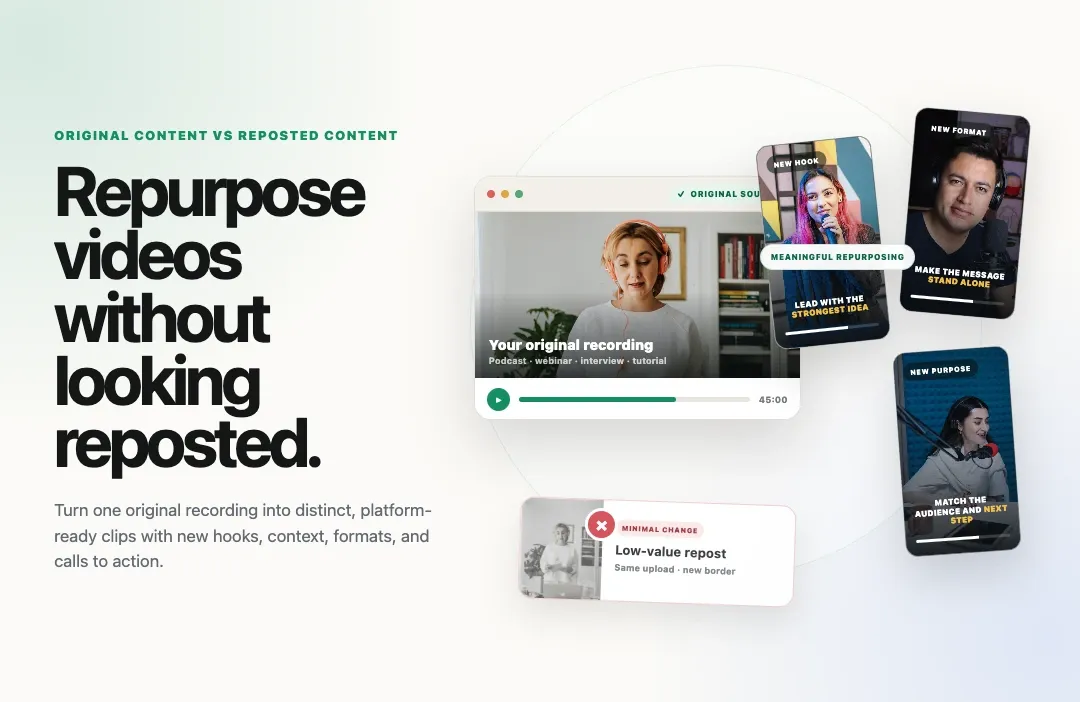
Social platforms are drawing a harder line between original content and low-value reposts.
In March 2026, Meta clarified that Facebook would give more reach and monetization opportunities to original creators while deprioritizing duplicative posts and minor edits of other people’s work. Meta specifically listed adding borders, inserting captions and changing a Reel’s speed as examples of low-value changes when the underlying post belongs to someone else.
YouTube has a similar but importantly different standard for monetization. Its reused-content policy looks for significant original commentary, substantive modifications, or educational or entertainment value. TikTok’s Creator Rewards Program also requires original, high-quality videos and excludes several forms of copied or lightly modified content.
That does not mean repurposing is dead.
It means creators and brands need to understand the difference between repurposing a source they created and reposting a finished post they copied.
A podcast episode turned into a focused expert clip is repurposing. A webinar answer reframed for a vertical screen is repurposing. A customer interview turned into a problem-and-result story is repurposing.
Downloading another creator’s Reel, adding subtitles and uploading it as your own is not the same workflow.
This guide explains what original, reposted, reused and repurposed video mean in practice and how to turn existing recordings into fresh short-form content without relying on low-value duplication.
Quick answer: Repurposing your own original footage usually remains original because you created or produced the source. Repurposing third-party footage requires meaningful new commentary, analysis, storytelling or creative transformation and copyright, licensing and individual platform rules still apply. No edit guarantees reach.
Free plan. No catch.
Turn long recordings into focused clips, add captions, reframe the speaker and prepare platform-ready versions with Reap.
What is original content?
Original content is video that you created, filmed, produced or substantially shaped with your own creative contribution.
The clearest example is a recording you made yourself: your podcast, webinar, interview, tutorial, presentation, product demonstration, course lesson or livestream. The full recording and the useful clips extracted from it come from your production.
Original does not have to mean “never seen before in any form.”
A 45-second answer taken from your one-hour webinar can still be an original asset. It may use existing footage, but it gives one moment a new structure, audience and purpose. The editorial work is not pretending the source never existed. It is turning the source into something that works independently.
Meta’s 2026 Facebook guidance says content filmed or produced directly by the creator or owner of a Profile or Page is considered original. It also says third-party material can qualify when a creator adds genuinely new information, analysis or substantial improvement to the storyline.
The practical principle is simple:
Viewers should be able to identify what you created, explained, changed or added.
Repurposed, reposted, cross-posted and remixed are not the same
These terms are often used interchangeably, but they describe different publishing decisions.
|
Term |
What it means |
Example |
|---|---|---|
|
Original content |
You created or produced the source and the final asset. |
A tutorial you filmed and edited. |
|
Repurposed content |
You adapt an existing source into a new asset with a different job, format or audience. |
A webinar answer turned into a captioned vertical clip. |
|
Cross-posted content |
You publish your own video on more than one platform. |
Your original clip uploaded separately to Shorts, Reels and TikTok. |
|
Reposted content |
You share an existing finished post again, either natively or by uploading a copy. |
Using Instagram’s Repost button or downloading another account’s Reel. |
|
Remixed content |
You incorporate part of another work into a new response, analysis, parody or story. |
Using a short clip as evidence inside your on-camera critique. |
|
Reused content on YouTube |
A YouTube monetization category for content sourced elsewhere without enough original value. |
A compilation of social clips with little narrative or commentary. |
The safest and most scalable model is to begin with a source you own, then create distinct assets from it.
If you simply want to share someone else’s Instagram post, Instagram’s native Repost feature preserves credit to the original poster. That is more transparent than downloading the file and uploading it as if your account created it.
Does repurposing video hurt reach?
There is no universal platform rule saying that a creator loses reach simply because a video came from their own longer recording.
The risk comes from confusing repurposing with duplication.
Meta says original Facebook content can receive greater reach, while duplicative or minimally altered third-party posts may be deprioritized. Instagram has also said that when it detects identical content in recommendation surfaces, it can recommend the original version instead of the repost.
On YouTube, the frequently discussed “reused content” rule is a channel monetization policy, not a published promise that every repurposed video will lose recommendation reach. YouTube says reused content is material already available online that does not add significant original commentary, substantive modifications, or educational or entertainment value. Reviewers may assess the channel as a whole, including its videos and metadata.
TikTok’s originality requirements cited in this article relate specifically to the Creator Rewards Program. They should not be treated as a complete explanation of TikTok’s general recommendation system.
Those distinctions matter. Reach, recommendation eligibility, monetization, copyright and AI disclosure are related topics, but they are not one rule.
A strong repurposing strategy improves your chances of publishing useful, platform-appropriate content. It cannot guarantee distribution because audience response, retention, topic demand, competition and platform systems also affect performance.
What the major platforms say about original and reused video
|
Platform |
Relevant rule |
Practical implication |
|---|---|---|
|
|
Facebook prioritizes content filmed or produced by the creator and may deprioritize duplicated third-party posts or low-value changes. |
Your own podcast, webinar or interview can supply original clips. Captions alone do not make a copied third-party Reel original. |
|
|
Instagram can replace identical reposts with the original in recommendations. Its native Repost feature credits the original poster. |
Create meaningful versions from your source. When you only want to share another creator’s post, use the native attribution path. |
|
YouTube |
YouTube’s reused-content monetization policy requires meaningful difference, commentary, modification, or viewer value. Permission and copyright are evaluated separately. |
Make your creative contribution obvious. Do not build a channel from compilations or copied social clips with minimal narrative. |
|
TikTok |
Creator Rewards requires original, high-quality videos. TikTok lists copied videos, other people’s watermarks and slight modifications among ineligible examples. |
For Rewards eligibility, create and produce the video yourself, meet the program’s other requirements and review current regional rules. |
For the current wording, consult the official Meta original-content guidance, YouTube channel monetization policies and TikTok Creator Rewards information.
Why captions and cropping are not enough on copied footage
Captions, reframing and branding are valuable editing tools. They make your own clips easier to watch and better suited to each platform.
They are not a shortcut for claiming someone else’s work.
Meta’s Facebook guidance explicitly identifies adding borders, inserting captions and changing playback speed as low-value changes when applied to someone else’s post without meaningful creative contribution. TikTok’s Creator Rewards guidance similarly identifies copied content with slight modifications, filters, fixed text or stickers as non-original examples.
This is the crucial context:
- Adding captions to your own podcast clip improves an original asset.
- Adding captions to someone else’s downloaded Reel does not automatically make it yours.
- Reframing your own webinar for a vertical screen is normal repurposing.
- Cropping out another creator’s watermark does not establish authorship or permission.
The editing action may look identical. The ownership, attribution and creative context are not.
Eight ways to repurpose videos without looking like a repost
1. Give every new clip one specific job
Do not begin with “make this shorter.” Begin with the outcome.
A clip might need to explain one feature, answer one objection, promote a replay, teach one lesson, introduce a speaker or support a sales conversation. The purpose determines what stays and what gets removed.
A new job creates editorial direction. Without it, repurposing easily becomes random excerpting.
2. Return to the clean source file
Use the original recording rather than downloading a compressed copy from a social platform.
The source file gives you better image and audio quality, cleaner framing, no inherited watermark and more room to choose a complete beginning and ending. It also makes the production history easier to document.
3. Build a new hook for the destination
A sentence that works after 12 minutes of a podcast may not work as the first sentence of a Short.
Move the clearest claim forward, add a concise text setup, or begin with the question the speaker is answering. Do not manufacture a misleading hook. Give viewers the minimum context they need to understand why the moment matters.
4. Make the clip understandable without the source
Remove references such as “as I said earlier” when the earlier section is not included. Add the subject’s name or topic when necessary. Keep the answer long enough to preserve its meaning.
The final clip should feel complete, not like a fragment that escaped from a longer timeline.
5. Adapt the frame, captions and layout
Choose the orientation based on where the video will live:
- 9:16 for vertical Shorts, Reels and TikTok
- 1:1 for a compact social-feed presentation
- 16:9 for standard YouTube, replay pages and product content
Keep faces, demonstrations and screen shares readable after cropping. Use captions for accessibility and silent viewing, but treat them as communication—not camouflage.
6. Change the editorial package, not just the pixels
A platform-ready version can use a different title, opening line, caption, description and call to action because the audience is encountering it in a different context.
A LinkedIn clip might end with a professional question. A YouTube Short might point to the full tutorial. A product-page clip may remove the social CTA entirely and focus on the demonstrated outcome.
7. Add real analysis when using third-party material
If your format depends on clips from other sources, make your contribution central.
Use the source as evidence inside a critique, lesson, comparison, parody, response or new story. Your explanation should change what the viewer learns or understands. A silent facial reaction, a border or a short introduction may not be enough under a platform’s originality or monetization standard.
Meaningful transformation does not eliminate copyright obligations. Obtain the necessary rights and consider legal advice when the use is uncertain.
8. Preserve attribution and publishing records
Keep the original recording, project file, guest release, license and export history. Credit collaborators where appropriate. If the goal is simply to share another creator’s Instagram post, use the native Repost feature rather than presenting a downloaded copy as your upload.
Clear provenance protects relationships as well as platform eligibility.
Weak reposts versus strong repurposed videos
|
Source |
Weak version |
Strong repurposed version |
|---|---|---|
|
Podcast |
A random one-minute excerpt that starts mid-sentence. |
One complete expert answer with a clear opening, speaker label, captions and a relevant CTA. |
|
Webinar |
The same horizontal recording cropped until the slides become unreadable. |
A focused Q&A or product moment with speaker-aware framing and enough context to stand alone. |
|
Customer interview |
A montage of vague praise. |
One concise problem, decision and measurable outcome presented as a customer story. |
|
Product demo |
A fast screen recording containing several unrelated features. |
One workflow showing one problem, the action and the result. |
|
Third-party clip |
A downloaded Reel with new subtitles and a logo. |
A properly sourced excerpt used inside substantial on-camera analysis, where rights and platform rules permit it. |
How to repurpose original videos with Reap
Reap’s AI video clipping tool helps turn long-form source videos into short, editable clips. The most important input is not the software setting. It is the source and editorial goal.
Step 1: Start with footage you own or are authorized to use
Upload your podcast, webinar, interview, tutorial, course, presentation, livestream or product recording. If the video contains guests, music, stock footage or client material, confirm that your planned use is covered.
Reap can edit a file. It cannot determine ownership or grant rights to third-party material.
Step 2: Define the new asset before generating clips
Decide what the clip should accomplish. Useful directions include:
- Find complete answers to audience questions.
- Extract product demonstrations that show one outcome.
- Find practical lessons that work without the full episode.
- Identify strong opinions suitable for thought leadership.
- Create a trailer from the promise and strongest preview.
Reap’s clipping workflow lets you choose the source, genre, orientation, resolution, processing timeframe and target clip length. Clip Topics can guide the analysis toward specific subjects. Clip Prompts provide richer editorial direction through the Automation API and are currently described as a preview feature in Reap’s documentation.
Step 3: Generate candidates, not automatic approvals
Create a pool of possible clips and compare them. Reject clips that repeat the same point, begin without context, misrepresent the speaker or do not have a clear publishing purpose.
AI can accelerate selection. A person should still decide what deserves distribution.
Step 4: Make the creative contribution visible
Use Reap’s editor to refine the transcript, set a better start and ending, remove unwanted sections, correct caption words, change orientation, adjust framing, add text, apply branding or include supporting assets and B-roll.
The Reap editor documentation also covers transcript-based editing, caption timing, face tracking, manual framing and segment trimming.
Step 5: Export a clean version for each platform
Prepare the aspect ratio, safe areas, caption placement and CTA for the destination. Save a clean master so future versions do not inherit another platform’s interface elements or compression.
Cross-posting your own work can be efficient. Platform-specific versions are usually clearer because they respect the viewing environment and audience intent.
Can you repost your own video?
Yes, creators commonly bring back their own useful material. The better question is whether an unchanged repost is the best version for today’s audience.
Before reposting your own video, ask:
- Is the information still accurate?
- Will many current followers have already seen it?
- Can the opening be clearer?
- Does the platform now support a better format?
- Can you add a new example, result or perspective?
- Should the CTA change?
Sometimes the right move is a straightforward repost of your own evergreen clip. Often, a refreshed edit gives the idea a better reason to return.
Can you post the same original video on every platform?
You can distribute a video you created across multiple platforms, subject to each platform’s terms and any rights attached to the footage or music.
However, “allowed” and “optimized” are different questions.
The same source can support several versions:
- A 90-second professional explanation for LinkedIn
- A 45-second vertical lesson for YouTube Shorts
- A faster question-led version for Reels
- A search-focused answer for TikTok
- A caption-free product-page version with a different CTA
You do not need to invent a new idea for every destination. You need to package the idea so it makes sense there.
Common mistakes that make repurposed content look unoriginal
- Using a social download as the master file. It carries compression, interface residue and possibly another platform’s watermark.
- Adding subtitles to someone else’s post and calling it transformation. Captions improve access but do not establish authorship.
- Publishing fragments without context. A clip that makes no sense alone offers little new value.
- Generating dozens of nearly interchangeable videos. YouTube’s monetization policies also address repetitive, mass-produced or templated content with little variation or value.
- Assuming permission resolves every platform rule. YouTube explicitly separates its reused-content monetization policy from copyright, permission and fair use.
- Using the same hook and CTA everywhere. The footage may be original, but the package can still feel misplaced.
- Hiding the source. Transparent attribution is safer than trying to disguise where footage came from.
- Letting AI publish without review. Automation can increase output faster than it increases judgment.
A pre-publishing originality checklist
Before publishing a repurposed video, confirm the following:
- We created the source or have the necessary rights to use it.
- The clip has one clear audience and purpose.
- The opening works without the full recording.
- The ending completes the idea rather than cutting it off.
- The edit preserves the speaker’s intended meaning.
- The creative contribution is clear to viewers.
- The captions, names, numbers and claims are accurate.
- The framing keeps the speaker, slides or product interface readable.
- The title, description and CTA fit the destination.
- The final export does not misrepresent ownership or remove required attribution.
If several answers are “no,” the asset probably needs more editorial work.
How to measure whether repurposing is working
Do not judge the strategy only by the number of clips produced.
Track metrics connected to the clip’s job:
- Reach to followers and non-followers
- Average watch time and completion rate
- Rewatches
- Shares and saves
- Comments that indicate understanding or intent
- Profile visits and new followers
- Clicks to the full video, replay or product page
- Leads, demo requests or sales-assisted usage
Compare formats rather than assuming one edit works everywhere. A clip that performs modestly as entertainment may still succeed as a sales follow-up. A widely viewed clip may fail if it attracts the wrong audience.
Repurposing is valuable when it extends the useful life of an idea, not merely when it multiplies file count.
The bottom line
Original content and repurposed content are not opposites.
Your long-form recording can remain original while becoming a trailer, tutorial, product clip, customer story, Q&A answer or platform-specific Short. The source is yours, and each new asset can offer a distinct piece of value.
The real divide is between thoughtful transformation and low-value duplication.
Start with footage you created or are authorized to use. Give every clip a specific purpose. Make the context complete. Adapt the format honestly. Preserve attribution. Review the result before publishing.
That is how you create more content without making your audience or the platform feel that they have already seen the exact same post.
Use Reap to turn your podcasts, webinars, interviews and product videos into focused short clips with captions, reframing and detailed editing controls.