Social media scheduler
Schedule a month of short-form video in minutes.
Create, schedule, and publish short-form video to TikTok, Instagram Reels, YouTube Shorts, and LinkedIn, without downloading files or switching tools.
Create once. Publish across every channel.
Finished clips
 0:42
0:42 0:31
0:31 0:58
0:58Your calendar
Your video workflow shouldn’t end at Export.
Downloading clips, renaming files, opening four platforms, and rebuilding every post turns publishing into another production job. reap keeps the last mile inside the same workspace.
Without reap
Publishing becomes a second job.
- Edit
- Export
- Download
- Rename
- Upload to each platform
- Track it somewhere else
Six handoffs, four browser tabs, every single clip.
With reap
Publishing is part of the edit.
- Create
- Review
- Schedule
- Published
One workspace, from the source video to the live post.
Start schedulingFrom raw video to a consistent publishing rhythm.
Scheduling is the last step of a workflow that starts with the source video. Clipping, captioning, reframing, and publishing all happen in the same place.
Create publish-ready clips
Find strong moments, reframe for vertical, add captions, and keep every output on-brand.
Plan visually
See your schedule by week or month across your connected accounts.
Publish automatically
Choose a date and time, or send an exported clip live immediately.
Content calendar
See the whole month. Control every post.
Move between week and month views, check what is scheduled, and manage multiple connected accounts from one social media content calendar.
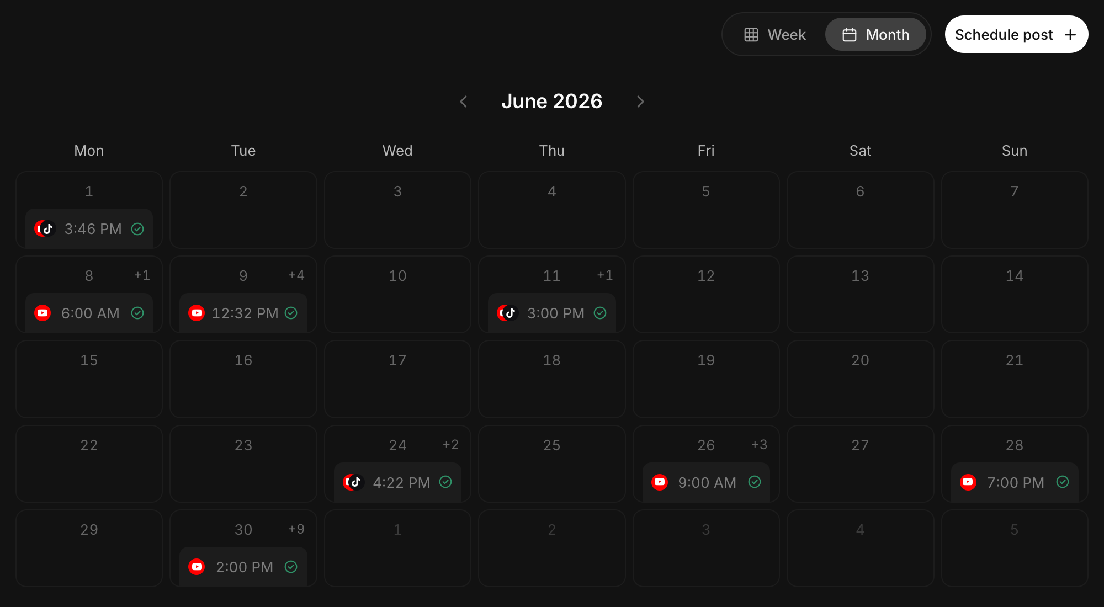
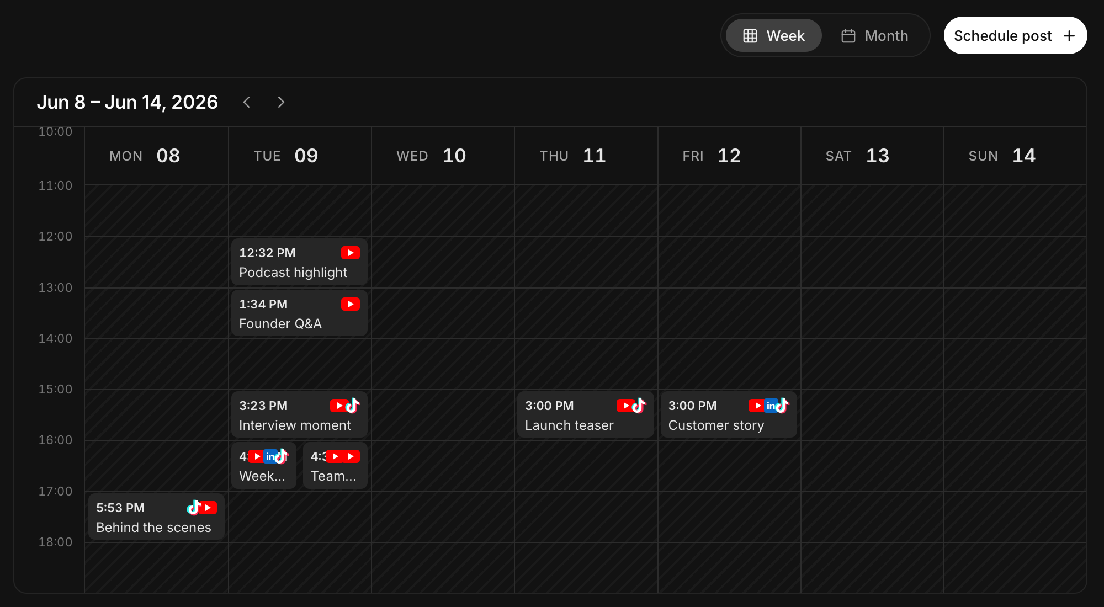
- Week and month viewsSwitch between an hour-by-hour week and the full month.
- Connected-account visibilityEvery connected account is listed beside the calendar.
- Timezone-aware schedulingSlots are shown in your studio’s timezone.
- Clear publishing statusEach scheduled post carries its own status marker.
Turn one video into days of content.
Select multiple clips from the same project, choose your platforms, set a starting time and posting interval, and add the entire batch to your calendar.
Clips that haven’t been exported yet can go into the batch too. reap queues them for export ahead of their publishing time.
Schedule where the work is already happening.
Scheduling isn’t a separate destination. It opens from wherever you happen to be looking at the clip.
- From a project
- Schedule the clip you are already reviewing.
- From the calendar
- Choose an existing reap clip or upload new content.
Add a title and social caption, pick the destinations, then schedule it for later, or publish an exported clip immediately.


One content engine. Multiple destinations.
Connect your accounts once, then select the right destinations whenever you schedule.
- YouTube
- TikTok
Connect more than one account per platform if you run several channels, and every connected account shows up beside the calendar.
Schedule from code, or from your agent.
Everything the calendar does is also a publishing API and the same actions reach Claude, Cursor, and any other MCP client through reap’s MCP server, where an agent can cut the clips and schedule the run in one conversation.
- Schedule a batch in one call
- Send up to 50 clips with a start time and a posting interval, and reap spaces the run out across your connected accounts.
- Publish immediately
- Push a finished clip live to your connected accounts and read back the published URL for each platform.
- Read and amend the queue
- List posts by status, then retitle, retag, or move one to a new time before it fires.
- Cancel a scheduled post
- Delete a post and its schedule is cancelled with it, so nothing goes out.





Built for anyone with more content than time.
The pattern is the same everywhere: more finished clips than slots in the week, and no appetite for uploading them by hand.
Podcasters
One episode is a week of shorts. They only need dates.
Creators
Post every day without editing every day.
Social teams
Four accounts, one month, nobody chasing a spreadsheet.
Agencies
Every client's month in a single view.
Founders
Schedule from the terminal. The calendar catches up.
Course creators
One lecture, cut up and spread across a term.
Webinar hosts
Last month's session is still worth posting this month.
Coaches
Talk once. Show up all week.
Conference teams
Three days of talks, posted out over a month.
Musicians
A single session becomes a month of teasers.
Frequently asked questions
Yes. reap publishes to YouTube, TikTok, Instagram and LinkedIn from a single calendar, and one clip can go to several accounts at once. Pick the destinations when you schedule the post.
Yes. reap schedules LinkedIn video posts from the same calendar as your TikTok, Instagram, and YouTube clips. Connect your LinkedIn account, pick it as a destination, and set the date and time.
Yes. Schedule the clip once per destination with its own date and time, or bulk-schedule a batch and set an interval so reap spaces the run out automatically.
Yes, and this is unusual: most schedulers need a finished file. reap queues the export ahead of the post’s slot, so you can plan the week before the render is done.
No. reap cuts the clips, adds captions, reframes to vertical and schedules the posts in one workspace, no downloading a file and re-uploading it somewhere else.
Yes. The Schedule Post dialog has two tabs: pick an existing clip from your reap projects, or switch to Upload new and add your own media, then add the title, caption, destinations, date, and time.
Yes. Connect multiple accounts and they all appear in the calendar’s Connections list. When you schedule a post you choose which of those connected accounts it publishes to.
Yes. reap’s publishing API schedules batches, publishes immediately, reads the queue and cancels posts, and the same actions are available to AI agents through reap’s MCP server.
Scheduling places a post on your calendar for a date and time you choose. Publishing now sends an already exported clip live to the selected accounts immediately.
Your next month of content starts with one video.
Turn long-form video into finished clips, then schedule every post from the same reap workflow. Plans and limits are on the pricing page.