reap for creators
Create once. Keep every channel moving.
Turn long YouTube videos into captioned, branded clips for Shorts, Reels, TikTok, LinkedIn, and more, then edit, localize, and schedule the rollout without rebuilding your workflow.
Your ideas deserve more than one upload.

Hookthis changed everything
Key lessonstart with one channel
Quotestop waitingOne upload. Every clip a channel needs.
- Hook clips The first few seconds
- Story moments The bit people re-share
- Tutorial cuts One step, one clip
- Q&A answers From your own comments
- Podcast clips From long-form episodes
- Stream cuts From a recorded live
- Localized versions 100+ caption languages
Captions, translation, and dubbing are paid-plan capabilities. Every clip opens in the editor before it goes anywhere.
Creating the video is only half the workload.
A long video can take days to plan, record, and publish. Then the same creator is expected to find the clips, edit the Shorts, add the captions, resize the footage, upload everywhere, and do it all again for the next video.
- Plan
- Record
- Edit the long video
- Find short moments
- Edit again
- Caption
- Reframe
- Upload everywhere
- Start over ↺
You shouldn’t need to recreate the production process for every platform. The ideas are already recorded. What’s missing is the system that carries them to every feed.
The content is already there
Make more from what you already create.
reap works as an AI clip maker for the videos you already have: it surfaces multiple candidate clips, so your next Short, Reel, or TikTok can begin with an idea you have already recorded. Content repurposing starts with your own library, not a new shoot.
Which of these a video holds depends on the video. reap surfaces candidates, not a fixed count.
Different creators need different clips.
Pick the shape of your channel. The source, the prompt, and the moments worth clipping change with it.
Source
A 28-minute video essay, freshly uploaded
An example prompt
“Create a trailer for this video, then find my three strongest opinions.”
Moments worth clipping
- Trailers
- Strong opinions
- Key lessons
- Memorable stories
- Short explainers
A trailer for the premiere, plus vertical opinion clips for Shorts.

Sources, prompts, and outputs are illustrative. What a video yields depends on what it contains.
Making a podcast? Episodes have their own workflow: clips, multi-speaker reframing, and audiograms for audio-only shows.reap for podcasters →Understand the moment
A good clip is more than a matching sentence.
reap analyzes spoken ideas alongside visual and audio signals like faces, tone, pauses, and pacing to surface moments that can work outside the original video.
Transcript-only selection
- Reads the words
- Can miss the delivery and the reaction
- Can miss what's happening on screen
reap’s multi-signal analysis
- Considers the spoken idea
- Considers tone, pauses, and pacing
- Considers faces and visual context
- Returns candidates for your review
No tool catches every moment, and no AI clip generator honestly claims to. reap returns candidates for your review.
Tell reap what kind of clip you need.
Guide clipping by topic, intent, audience, hook, or campaign instead of relying only on generic highlight detection. reap’s AI video clip generator sends the moments back cut, captioned, and sized for every platform.
this changed everything
start with one channel
everyone missed the point
stop waitingPrompts are examples, not guarantees. What comes back depends on what the video actually contains.
Explore AI video clippingAI does the first pass
You still decide what represents you.
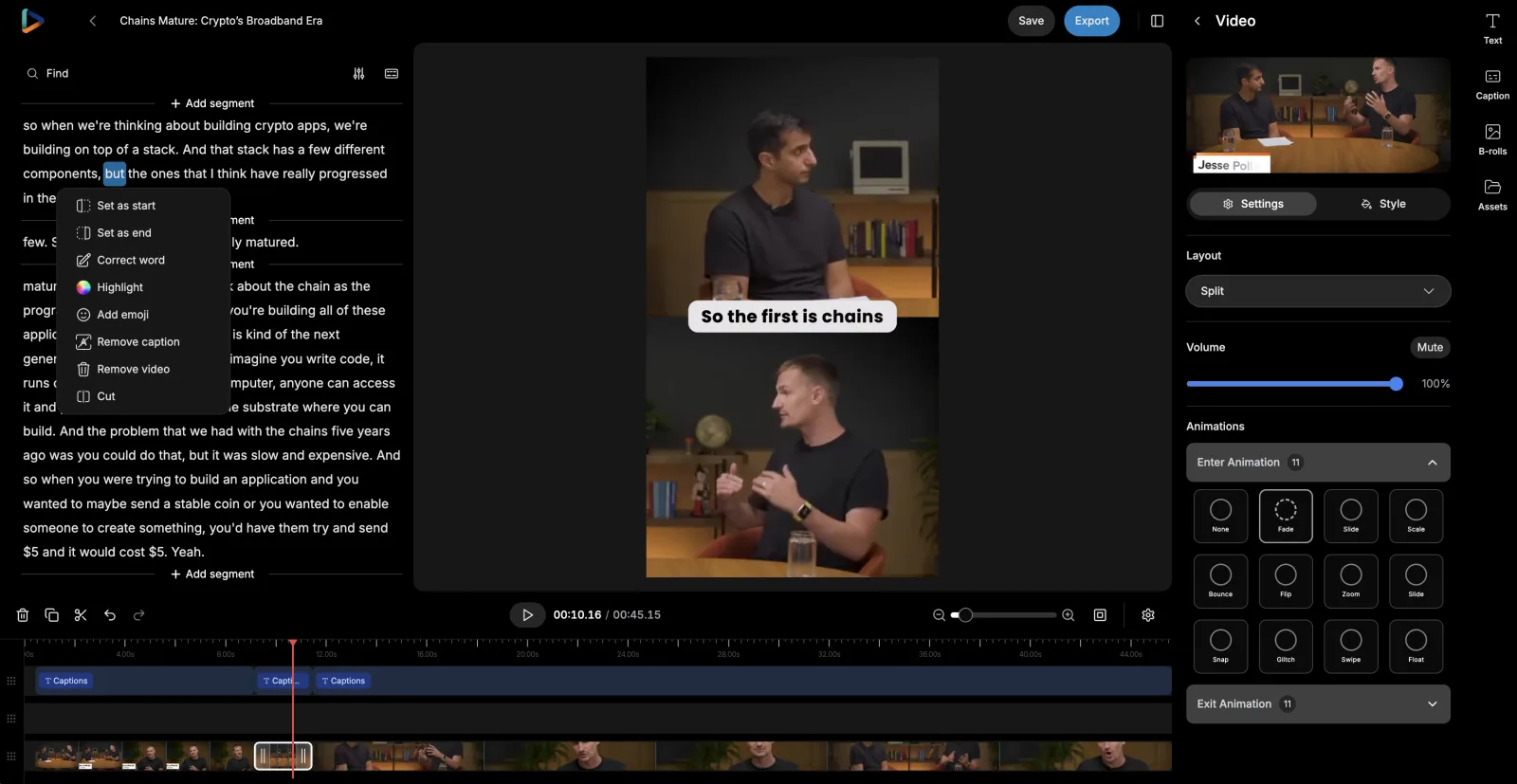
Review the suggested moments, adjust the timing, correct the transcript, remove unwanted sections, and refine the final clip inside reap’s AI video editor. Nothing ships until you say so.
- Set where each clip starts and ends
- Correct words and cut sections through the transcript
- Restyle captions and adjust the framing
- Add text, assets, and B-roll
- Preview everything before it ships

Your framing should follow the content.
Turn landscape footage into portrait or square video while keeping you, or whatever matters in the shot, visible, with room left for captions.
- Speaker and face tracking keep you in frame
- Motion-aware framing follows the action
- Portrait, square, and landscape from one source
- Manual framing control when you want it
Captions people recognize before they read.
Most feeds start muted, so the captions carry the moment. Apply animated styles, highlight the words that matter, and save the visual system that makes each clip recognizably yours. These live previews come straight from the caption tool’s 50+ preset library.
- Captions timed word by word
- Keyword highlighting and emoji where they fit
- Your fonts, colors, and safe positioning
- 100+ languages, native or Roman script
Your look, every time
Stop restyling every clip from scratch.
Save your fonts, colors, caption style, logo, intro, outro, background, and orientation in a reusable brand template. Apply it when clips are created, and every output is recognizably yours: the educational Short, the product clip, the LinkedIn cutdown, and the Spanish variant.
One template per format or audience. The same clip pipeline, different uniforms.
- Caption style
- Impact
- Font
- Montserrat-Bold
- Logo
- Top left
- Intro / Outro
- Opener · End card
- Orientation
- Portrait · 1080p
Saved once · applied to every new clip


Your audience is bigger than your recording language
Don’t let the recording language define the audience.
Three different treatments, three different jobs. Pick per clip and per audience.
Caption translation
Changes the written text. The clip keeps your original voice; the captions read in the viewer's language.
Roman script
Changes how a language is written. Hinglish, Romanized Urdu, Arabizi: captions the way audiences actually type and read on social.
AI dubbing
Changes the spoken audio. Selected clips re-voiced in 80+ languages and regional variants.
Translated captions and subtitles change what viewers read; AI dubbing changes what they hear.
Turn finished clips into a publishing rhythm.
Review the outputs, choose connected accounts, and spread the clips across a week or a month instead of uploading each one manually. A video repurposing tool only pays off when the outputs actually ship.
- Day 1UploadTrailer
- Day 2Key lesson
- Day 4Strong opinion
- Day 6Story moment
- Day 8Localized variant
A suggested pattern, not a rule. Week and month views, bulk scheduling, and multiple connected accounts are all in the clipping tool’s publishing flow.

From source to schedule
Everything between the long video and the daily feed.
- Record elsewhere
- Add the video to reap
- Describe what you want
- Review candidate moments
- Edit in the transcript
- Reframe
- Caption
- Apply your brand template
- Translate or dub
- Schedule or export
reap doesn’t record or livestream. Step one stays with your camera, your screen recorder, or your streaming setup. Everything after it is the part reap takes off your plate.
Spend your time creating, not repeating setup.
The creative calls stay yours: what to make, and which moments represent you. What changes is everything around those calls.
| Task | Doing it by hand | With reap |
|---|---|---|
| Finding the moments | Rewatch the whole video and note timestamps by hand. | Review suggested moments, or prompt for exactly the kind you want. |
| Cutting the clips | Cut every clip separately on a timeline. | Adjust clip boundaries in the transcript. |
| Vertical reframing | Keyframe crops so you stay centered in every Short. | Speaker and face tracking keep the subject in frame automatically. |
| Captions and branding | Restyle captions and re-add your branding clip by clip. | A saved caption style and brand template apply to new clips. |
| Reaching other languages | Rebuild subtitles for each language, or skip those audiences. | Translate captions or dub selected clips into supported languages. |
| Publishing | Export, download, and upload each clip to each platform. | Schedule finished clips across connected accounts from one calendar. |
| The next video | Rebuild the whole process from scratch. | The same setup runs again on your next upload. |
Built for the way your channel works.
Talking-head channels
Lessons, opinions, and stories told to camera, where spoken-word clipping is strongest.
Tutorial & how-to channels
Turn long walkthroughs into short lessons, quick tips, and course previews.
Commentary & reactions
Hot takes and arguments punchy enough to stand without the full context.
Review channels
Verdicts, comparisons, and demos that answer one buying question each.
Vloggers & storytellers
Surface the story beats and spoken moments that hold up outside the full vlog.
Founder-led creators
Product walkthroughs, updates, and talks become a steady founder feed.
Streamers & gaming
Highlight clips that spare viewers the three-hour rewatch.
Creator teams & editors
Run one repeatable workflow across every channel you manage, or script it with the API.
Audio-first creators
Branded audiograms with waveforms and captions give narrated content a visual life.
Archive-heavy channels
Put years of existing uploads back to work without re-editing any of them.
Built with reap.
Every step of the creator workflow above is a product capability with its own page. Go deeper on the ones that matter to your channel.
Creators on reap
See what creators have to say
"I used to create clips by hand in FCPX. It literally would take 10-20 hours. No joke. But now the AI does it — and if you direct the AI, it's 90% there. Really impressive!"
"This is a gamechanger for me as a solopreneur that would rather focus on long form video. It has already saved me so much time — combining features of Canva, CapCut, Descript and DaVinci."
"I tried a 40 min video and it gave me all clips I needed within 10 min. I tried different similar tools — it took them almost 2 days. Reap does the job perfectly well and quite fast."
"The AI seamlessly identifies the most impactful segments from my videos, helping me create attention-grabbing shorts in a fraction of the time. If you're a content creator, Reap is a game-changer!"
"Even at the entry level, it gave me powerful functionality that felt premium. What used to take hours, Reap helps me finish in minutes. The customer support is very fast and incredibly friendly."
"Excellent for converting long videos into shorter ones for YouTube. It offers many beautiful style captions, and the auto zoom and auto reframe features enhance the viewing experience."
"I used to create clips by hand in FCPX. It literally would take 10-20 hours. No joke. But now the AI does it — and if you direct the AI, it's 90% there. Really impressive!"
"This is a gamechanger for me as a solopreneur that would rather focus on long form video. It has already saved me so much time — combining features of Canva, CapCut, Descript and DaVinci."
"I tried a 40 min video and it gave me all clips I needed within 10 min. I tried different similar tools — it took them almost 2 days. Reap does the job perfectly well and quite fast."
"The AI seamlessly identifies the most impactful segments from my videos, helping me create attention-grabbing shorts in a fraction of the time. If you're a content creator, Reap is a game-changer!"
"Even at the entry level, it gave me powerful functionality that felt premium. What used to take hours, Reap helps me finish in minutes. The customer support is very fast and incredibly friendly."
"Excellent for converting long videos into shorter ones for YouTube. It offers many beautiful style captions, and the auto zoom and auto reframe features enhance the viewing experience."
"What I like most is how clean and practical the workflow is. The clip library is especially useful — clips can be reused, scheduled later, and managed across multiple channels."
"This is an excellent app. Works fast and reliable and is easy to use. I used it to create clips from 80-minute long videos and from shorter videos. Love the viral rating score."
"A fresh, efficient alternative. The AI-powered clipping and captioning make turning long videos into social-ready clips much faster and easier. The text-based editing is intuitive, and multilingual support is a big plus."
"The text-based editing saved me a lot of time, and the automatic audio cleanup worked surprisingly well. It supports multiple languages and lets you add your own branding."
"Reap is an incredibly efficient tool. Its AI-powered features, like text-based editing and automatic captioning, save me hours of work and deliver great results."
"Amazing software for clips. I love using this — it is a true game changer to save me countless hours."
"What I like most is how clean and practical the workflow is. The clip library is especially useful — clips can be reused, scheduled later, and managed across multiple channels."
"This is an excellent app. Works fast and reliable and is easy to use. I used it to create clips from 80-minute long videos and from shorter videos. Love the viral rating score."
"A fresh, efficient alternative. The AI-powered clipping and captioning make turning long videos into social-ready clips much faster and easier. The text-based editing is intuitive, and multilingual support is a big plus."
"The text-based editing saved me a lot of time, and the automatic audio cleanup worked surprisingly well. It supports multiple languages and lets you add your own branding."
"Reap is an incredibly efficient tool. Its AI-powered features, like text-based editing and automatic captioning, save me hours of work and deliver great results."
"Amazing software for clips. I love using this — it is a true game changer to save me countless hours."
Frequently Asked Questions
Spoken-word video is where reap is strongest: YouTube videos, talking-head content, tutorials, commentary, reviews, interviews, presentations, vlogs, and stream recordings with clear speech. Sources up to 180 minutes go in whole. Audio-only recordings work too: they become audiograms rather than camera footage.
Yes. reap is a YouTube Shorts maker and YouTube clip maker that turns a long video into Shorts: paste a supported link or upload the file, and the AI suggests standalone moments, or you describe the moments you want. Clips come back cut, captioned, and reframed for vertical, ready to review, refine, and publish as Shorts, Reels, or TikToks.
Yes. The same clips make reap an Instagram Reel maker as well: every clip is cut and reframed for 9:16, captioned, and branded, and you can schedule it to Instagram Reels, TikTok, YouTube Shorts, and LinkedIn on Creator, or export it as an MP4. One long video becomes clips for every short-form channel rather than one.
Yes. Prompt-first clipping takes plain language: "create a trailer for this video", "find every practical tip about growing a newsletter", "pull the moments where I compare the two products". What comes back depends on what the video actually contains. reap finds moments, it doesn't invent them.
Yes. Every clip opens in reap's AI video editor: adjust clip boundaries in the transcript, fix words, cut sections, restyle captions, change the framing, and add text, assets, or B-roll before anything is exported or scheduled. The AI drafts; you decide what ships.
Yes. Animated captions in 100+ languages, timed word by word, with keyword highlighting, emoji support, custom fonts, colors, and positioning. Save the style once and it applies to the clips you create after that: no restyling every video by hand.
Yes. Speaker and face tracking keep you, or whoever is talking, visible when landscape footage becomes a 9:16 clip, and the framing leaves room for captions. Square and landscape layouts are there too, and you can always adjust the framing manually.
Yes. A brand template saves your fonts, colors, caption style, logo, intro, outro, background, and orientation once, and applies to the clips you create after that, so every output is recognizably yours without restyling from scratch. It doesn't restyle videos you've already exported.
Both, and they're different things. Caption translation changes the written text into 100+ languages, including native and Roman scripts like Hinglish and Romanized Urdu. AI dubbing replaces the spoken audio in 80+ languages and regional variants. You choose per clip which treatment an audience gets.
Yes. Pick the finished clips, choose connected accounts, and place posts on a week or month calendar, individually or in bulk, across supported platforms like TikTok, Instagram Reels, YouTube Shorts, LinkedIn, and Facebook.
Yes. Video repurposing in reap works on any supported video, whenever it was recorded: recut an evergreen tutorial, resurface a strong opinion, or localize a video that already proved itself. You choose which videos deserve a second life; reap doesn't rank your archive for you.
No, and no tool can. reap helps you surface and evaluate candidate moments, produce them well, and publish consistently. Which clips take off depends on the content, the audience, and the platform. What reap removes is the repetitive production work between recording and posting.
No. reap is not a camera app, a streaming tool, or a hosting platform. Record with the setup you already use. reap takes the finished recording and handles everything between that file and the social feed: clipping, editing, captions, reframing, branding, localization, and scheduling.
Yes. Podcast episodes have their own rhythm: episode-based clips, multi-speaker reframing, and audiograms for audio-only shows. The reap for podcasters page covers that complete workflow, from episode to scheduled rollout.
Yes. The API, CLI, MCP server, and webhooks run the same pipeline as the dashboard on the same plan credits, so teams and editors can script video-in, clips-out workflows, and anything an automation starts, a human can review and finish in the studio.
Create once. Keep every channel moving.
Your next month of content may already be recorded
Turn the videos you already create into clips, captions, localized versions, and a consistent publishing rollout with reap. Plans on the pricing page.
Create free clipsExplore reap