reap for coaches
Turn your expertise into content that keeps teaching.
Turn Zoom recordings, workshops, lessons, Q&As, and podcasts into clear, branded clips through one connected workflow.
One session in. A month of short lessons out, each one reviewed by you.
Teachable moments
- 08:12The two-list planning framework
- 21:47Where most people stall in week two
- 36:05Learning how to think critically
- 49:38A question from the room, answered
- 58:21What to do before the next session
Every one of them stays editable
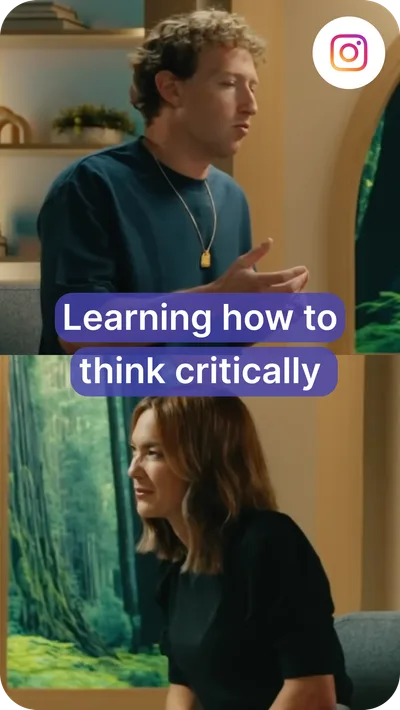
One session. Every clip a program needs.
- Lesson clips From a workshop or class
- Framework cuts The idea, on its own
- Q&A answers From an open session
- Course previews From a recorded module
- Client stories Released with permission
- Podcast cuts From coaching episodes
- Localized versions 100+ caption languages
Captions, translation, and dubbing are paid-plan capabilities. Every clip opens in the editor before it goes anywhere.
Your next month of content may already be recorded.
Coaches are not short of material. The hard part is turning three hours of it into pieces that each teach one useful idea.
- Find the recording and get it out of the meeting tool
- Rewatch the session to remember what you covered
- Note the timestamps worth keeping
- Write out what to cut and where
- Cut each clip on its own
- Fix the terms transcription got wrong
- Reapply your fonts, colours, and logo
- Reformat for each place it will be watched
- Write the posts and queue them up
The usual route
- Session ends, recording sits there
- Rewatch it to place the moments
- Write the editing instructions
- Cut, caption, and restyle each clip
- Rebuild it for every format
- Post them one at a time
With reap
- Session ends, recording goes in
- Say which lesson you are after
- Review the moments it comes back with
- Refine the ones worth keeping
- Brand template and formats applied
- Export or schedule the approved set
One session, many lessons
Create more ways for people to learn from one session.
A 68-minute workshop is not one video. It is a framework, an exercise, a common mistake, and an answer that each deserve their own clip.
- WorkshopA live or recorded working session
- Core framework
- Practical exercise
- A common mistake
- Audience question
- Actionable takeaway
- WebinarA scheduled session with registrations
- Registration teaser
- Key lesson
- Objection response
- Short recap
- Follow-up content
- Course lessonA module you already recorded
- Concept explanation
- Beginner tip
- Worked example
- Short demonstration
- Lesson preview
- Coaching podcastAn episode with a guest or co-host
- Guest insight
- Framework explanation
- Where two views differ
- Episode teaser
- Audiogram
- Q&A sessionAn open session or office hours
- Frequently asked question
- A concise answer
- A misconception, corrected
- Recommended next step
- Approved client interviewRecorded and released with permission
- The challenge they arrived with
- What the work was like
- What changed
- Advice for someone starting
Your call, every time
AI finds the starting point. You decide what teaches.
A suggested clip is a draft. It opens in reap’s educational video editor with the transcript beside it, so trimming means selecting words.
- Move the in and out points until the clip starts on the right word
- Fix a framework name or an acronym in the transcript, and the captions follow
- Restyle, resize, and reposition captions off the part of the frame that matters
- Add text overlays or B-roll, then preview the clip before it leaves reap
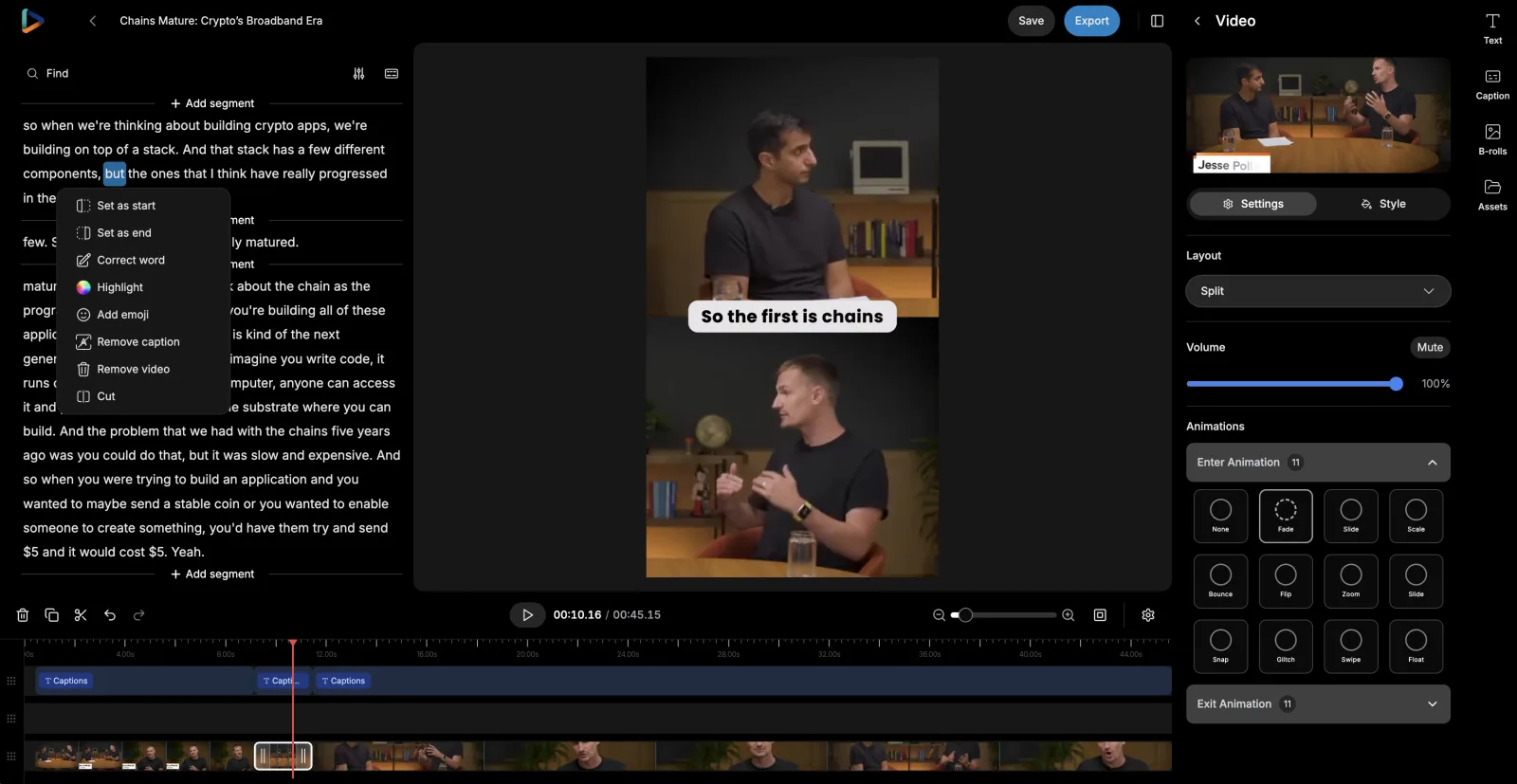
Make every lesson easier to follow.
Most short-form teaching is watched muted. Captions are what carry the explanation when the audio never plays.
Brand templates
Make every lesson recognisable.
Recognition is built from repetition. A brand template saves your look once and applies it as new clips are created.
- Caption style
- Impact
- Font
- Brand sans, uploaded
- Logo
- Top left
- Intro / Outro
- Opener · End card
- Applies to
- New clips in this project
Saved once · nobody restyles a lesson by hand


See the caption styling system, or read the brand template documentation

Channel formats
Teach clearly in every supported format.
A workshop is recorded in landscape and watched in portrait. Auto reframe produces a starting crop for each format, and you check it.
- Speaker detection and tracking keeps whoever is talking in frame
- A dynamic layout switch between single-crop, zoom-out, and split framing
- Portrait, square, and landscape from one recording
- Manual framing control, and a preview before anything exports
Reach further
Make your approved lessons accessible to more people.
Once a clip is approved, translate its captions, output Roman script, or dub the audio, and send that version down the same path.
- Approved clip
- Transcript
- Translated captions
- Roman script
- Dubbed audio
- A fluent review
Each step is a choice, not a chain you have to run in full.
Caption translation
Changes the written text. The clip keeps your voice and your delivery, and the captions read in the viewer's language.
Roman script
Changes how a language is written. Hinglish, Romanized Urdu, Arabizi: captions the way large audiences actually read.
AI dubbing
Changes the spoken audio. Approved clips re-voiced in 80+ languages and regional variants, on a monthly plan allowance.
AI captions and subtitles, multilingual subtitles, and how AI dubbing works
Distribution
Keep teaching between sessions.
One workshop is worth more than one post. Spread the clips across the days when you are not running a session. An example week:
- MondayStart of the weekA framework
- WednesdayMidweekA common mistakeAn audience question
- FridayEnd of the weekAn exercise or example
- WeekendSlower feedWorkshop or lesson preview

For programs that repeat
Create a repeatable post-session workflow.
The same group call every week means the same work after it. Three levels to run that at, and different programs can sit on different ones.
In the reap dashboard
For a solo coach, or for a workshop that only runs once.
- Add the recording, describe the lesson you want, pick the brand template
- Review the suggested moments and refine them in the editor
- Export the clips, or schedule them to a connected account
No-code automation
For the group call, office hours, or lesson that repeats every week.
- Triggers: a new project or a new upload in your reap studio
- Actions: create clips, captions, transcription, dubbing, or a reframe
- Read project status, details, and clips back to drive the next step
Developer and agent workflows
For a coaching program with technical help, or an agent already in the loop.
- REST API and CLI to submit recordings and collect finished clips
- Webhooks so you get told when a project finishes, instead of polling
- MCP server, so an agent can run the post-session job in plain language
What automation actually removes
An MCP client is a chat window: attach a recording, describe the lesson, get the same reviewable clips the dashboard produces.
- One instruction, whole pipeline
- A single ask covers finding moments, reframing, captions, and the brand template. No per-session setup.
- Get told, instead of asking
- Register a webhook and reap posts to your endpoint when clips reach a final state. No polling loop to babysit.
- Same credits as the dashboard
- API, CLI, and MCP draw plan credits 1:1. No separate metering, and no enterprise gate on automation.
- One studio, one set of templates
- Automated runs draw on the same brand templates and connected accounts you use by hand.
- Review stays in the loop
- Anything an agent starts, a person finishes in the studio. Nothing reaches a channel without you approving it.
Video editing API, MCP server, and the clipping agent
Claude
CursorChatGPT
VS Code
OpenClaw
One repeatable post-session workflow, end to end
A recording goes in, reviewable lesson clips come out. The first five nodes are published reap Zapier steps; the last one is the part that stays with you. Drag the nodes to explore the pipeline.
The approved session recording lands in your studio
Teachable moments for the goal you described
100+ languages, your saved caption style
9:16, 16:9, and 1:1 from one recording
80+ languages for a wider audience
Approve, then schedule or export
Drag nodes to explore the pipeline
Keep the teaching. Drop the rebuilding.
An AI video clipping tool does not touch the framework, the example that finally lands, or the judgement about what somebody is ready to hear.
| Task | Doing it by hand | With reap |
|---|---|---|
| Finding lessons | Rewatch the whole workshop and write down timestamps. | Generate candidate moments from the goal you describe, then review them. |
| Editing | Cut every video separately on a timeline. | Start from editable AI-generated clips and adjust the boundaries. |
| Captions | Transcribe and style captions on every clip individually. | Generate editable captions and apply a reusable preset. |
| Branding | Reapply your fonts, colours, and logo to every export. | Save it once as a brand template and apply it as clips are created. |
| Formats | Rebuild the video for each aspect ratio a channel wants. | Create the supported formats from one source, then check the crop. |
| Other languages | Move between separate transcription, translation, and dubbing tools. | Produce supported language versions in the same workflow. |
| Publishing | Download files, organise them, and schedule them somewhere else. | Export, or schedule approved clips to connected accounts from the calendar. |
One workflow, used differently by every kind of coach.
The same clipping, captioning, and publishing workflow, pointed at whatever each of them teaches.
Business coaches
One workshop becomes the framework explanation, the objection you answer every month, and the exercise people actually go away and do.
Executive and leadership coaches
Clips around giving feedback, making a decision with incomplete information, and running the meeting nobody wants to run.
Career coaches
Interview preparation, how to read a job description, and résumé guidance, cut out of the sessions where you already explained them.
Sales coaches
The discovery question that changes a call, the objection walkthrough, and the framework you draw on the whiteboard every time.
Communication coaches
Before-and-after moments from a live rehearsal, and the notes you gave, captioned so the point survives a muted scroll.
Fitness coaches
Approved demonstrations and the explanation behind them, kept together so the form cue is never separated from the reason for it.
Wellness coaches
Educational explanations from a public session, reviewed against your own scope of practice before any of it leaves the studio.
Course and workshop coaches
Lesson previews and single-concept explanations pulled from modules you have already recorded and already sold.
Consultants who teach
The industry explanation you give on every intro call, cut once from a talk instead of repeated live for the hundredth time.
Coaching teams and programs
A shared Team Studio on the Studio plan, so several coaches work from the same templates, assets, and calendar.
Built with reap.
One content repurposing workflow, and every step of it is a capability with its own page rather than a separate tool you stitch together.
AI video clipping
Turns a workshop, webinar, or lesson into candidate moments you can look through in minutes.AI captions
Carries the lesson in muted feeds: animated presets, 100+ languages, native and Roman scripts.AI video editor
Where you take over: move the in and out points, correct a term in the transcript, check the crop.Clipping agent
Runs the session-to-reviewable-clips loop from one instruction, so it happens without you starting it.Video editing API
Puts clipping in your own workflow: submit the recording, set the presentation genre, collect the results.AI dubbing
Re-voices an approved clip in 80+ languages, so a good explanation reaches past one language.Social scheduler
Queues the week from one session: pick the account, write the copy, set the time.MCP server

Lets Claude, Cursor, or any MCP client run a coaching clip job in plain language.Frequently Asked Questions
Anything already recorded: workshops, webinars, training sessions, course lessons, Q&A and office-hours sessions, keynotes, coaching podcasts, interviews, and livestream recordings. As a content repurposing tool it starts from the finished recording, so upload the file or import from YouTube, Twitch, X, or Vimeo. Paid plans clip sources up to 180 minutes, with uploads up to 5 GB on Free and 10 GB on paid plans. reap does not record, host, or run the session itself.
Download the recording from Zoom as an MP4 and upload it to reap; there is no direct Zoom connection, so the file is the bridge. reap transcribes the session, suggests clips, and opens each one in the editor, where you edit the Zoom recording by editing its transcript, fix captions, and reframe for vertical before exporting or scheduling. That makes it a Zoom video editor for the parts worth sharing, not for re-cutting the whole call.
Yes. A long session is exactly the shape reap is built for: it works from what was said, so explanations, frameworks, exercises, and audience questions are all findable. There is a genre-specific model for presentation content alongside talking head and gaming. How many usable clips a session yields depends on the recording, so reap does not promise a fixed number from any source.
Yes. Prompt-first clipping is available on paid plans, so you can describe what you want instead of relying on generic highlight detection: the clearest explanation of a framework, the most common beginner mistake, or the strongest answer from a Q&A. reap searches what is in the recording rather than inventing it, and it does not know your methodology, your professional discipline, or the learning outcome you had in mind, so treat what comes back as candidates.
Yes, and you should. Every suggested clip opens in reap's editor, where you can move the start and end points, correct the transcript, cut sections, restyle and reposition captions, adjust the framing, and add text or B-roll before anything is exported or scheduled. AI produces the first pass; whether the idea is complete and the advice is sound stays with you.
Yes. The transcript is editable, and a correction there carries into the burned-in captions. Plan for it: names, company names, framework names, industry terminology, acronyms, numbers, and overlapping question-and-answer audio are where transcription slips most. reap does not guarantee perfect transcription and does not check whether a term was used correctly.
Yes, through brand templates. A template saves a caption preset, uploaded fonts, a logo overlay, intro and outro cards, background, and orientation, then applies them as new clips are created. Font and template counts are plan-based: 3 on Creator, 6 on Studio, unlimited on Enterprise. A template applies to clips created after it is saved, so it does not restyle videos you already exported, and reap does not audit or lock templates.
Paid plans output 9:16, 16:9, and 1:1 from the same source; the free plan outputs 9:16 only. Auto reframe uses speaker detection and tracking, with a dynamic layout switch between single-crop, zoom-out, and split layouts. Review the crop before export: slides, whiteboards, demonstrations, screen shares, and a second speaker can all sit outside the frame reap chooses, and it does not know which of them your clip depends on.
Subtitle translation covers 100+ languages on paid plans, with Romanized script output for languages such as Hinglish, Romanized Urdu, and Arabizi. AI dubbing covers 80+ languages and regional variants on a monthly allowance: 2 hours on Creator and 5 hours on Studio. Caption translation changes the written text only; dubbing changes the spoken audio. Have someone fluent read a localized clip before it goes out, especially where the wording carries a health, financial, legal, or safety qualification.
Yes. Paid plans include the social media publisher and a content calendar, so you can pick a connected account, write the post copy, set the date and time, and see the week or month laid out. A bulk scheduler places several clips from one workshop at once, and the Studio plan adds AI-suggested posting times. The Creator plan publishes to TikTok, Instagram Reels, YouTube Shorts, and LinkedIn; Studio adds X and Facebook. Anything else is an MP4 export you hand to another tool.
That is your call to make, not a product setting, and reap has no consent or release management. Solo lessons, public workshops, webinars, podcasts, and interviews released with explicit permission are the safer material. Confidential one-to-one sessions, private group discussions, and anything containing a client's personal, health, financial, or employment details are not, and footage of minors needs appropriate consent. Follow your own client agreements, professional obligations, and the policies that apply to you.
No. There are no native Zoom, Google Drive, Dropbox, Slack, Notion, or course-platform integrations. What exists is a verified Zapier integration, which needs a paid plan and an API key from your reap dashboard, with triggers for a new project or new upload and actions for clips, captions, transcription, dubbing, and reframing, plus a REST API, a CLI, an MCP server, and webhooks. Those are the layers you connect other tools through.
The Team Studio workspace is on the Studio plan, with up to 3 member seats, Admin and Member roles, and shared projects so templates, assets, and the calendar live in one place. Enterprise adds unlimited seats and SSO. Free and Creator are single-seat. There are no formal approval workflows or client-review portals, so sign-off is a step your team owns.
No. reap removes the repetitive production steps between a recording and a publishable clip: finding candidate moments, cutting, captioning, reframing, restyling, and preparing language versions. Deciding which idea is worth sharing, whether a clip still carries its context, and whether the advice holds up out of the room is human work, and the editor is where that judgment gets applied.
No. reap produces and schedules video. It has no lead capture, no CRM, no email automation, no funnel or booking management, no payment collection, and no analytics or attribution. It also does not verify professional advice or fact-check a clip. What it changes is how quickly the teaching you already recorded becomes something you can publish.
Your best teaching deserves more than one session.
Get more out of the sessions you already recorded
Find the lessons worth sharing, caption them, apply your brand, and prepare approved clips for publishing. Plans are on the pricing page.
Start with reapSee how clipping works