reap for advertisers

Turn existing footage into more ad-ready creative.

Find hooks, demonstrations, proof points, objections, and customer stories inside your videos, then refine, brand, reframe, and localize the strongest cuts.

One recording in. The hook, the objection, and the proof out, each reviewed by you.

Objection angle: a vertical cut of someone talking to camera from a sofa, captionedHook angle: a vertical 9:16 cut of a shopper reacting, captioned and carrying a logoProof point angle: a vertical cut of a shopper holding a card and a phone, captioned
Three angles, cut from one 38:12 recording

One recording. Every kind of ad creative.

  • Product demo ads From your walkthrough
  • Testimonial ads With consent to advertise
  • UGC-style ads With paid usage rights
  • Founder-led ads From the founder video
  • App promo ads From a screen recording
  • Explainer ads From webinars and talks
  • Localized ads 100+ caption languages

Vertical video ads in 9:16, 1:1, and 16:9, with captions, translation, and dubbing on paid plans. Where the asset runs is your call, and your ad platform’s.

Footage you already own

More angles from the footage you already have.

Short-form ad creative rarely needs another shoot. Repurpose video content you already paid for, and cut the moments out of it.

  • Product demonstration

    The walkthrough recorded once per product or release

  • Customer testimonial

    Cleared for advertising use, not just for the website

  • Creator footage

    UGC video ads need paid usage rights, not only posting rights

  • Founder story

    The unscripted answer to why the product exists at all

  • App walkthrough

    A screen recording with someone talking over it

  • Product review

    Recorded with the reviewer's permission to use it commercially

  • Educational video

    A webinar, a workshop, or a long explainer already published

  • Brand campaign footage

    The long cut, the interviews, and everything left on the floor

Sources go in as an upload or a link from YouTube, Twitch, X, or Vimeo, up to 180 minutes on paid plans.

Explore AI video clipping

Prompt-first clipping

Find the angle inside the source footage.

Describe the objective instead of scrubbing a timeline. reap works from what was said.

  • Find the strongest opening statement about the customer problem.
  • Find the clearest demonstration of the main product benefit.
  • Extract the customer's reason for switching.
  • Find the response to the most common objection.
  • Find the existing spoken call to action.

Everything it returns is a candidate, and a silent visual sequence gives it much less to go on. How AI clipping works

One source, several directions

Build more creative directions from one recording.

One recording carries several arguments. Cut each on its own terms, then decide which is worth running.

  • Customer interviewRecorded and cleared for advertising use
    • The problem
    • The benefit
    • What it was like
    • The objection
    • The proof point
  • Product demoThe walkthrough you record once per release
    • Feature overview
    • Setup explained
    • A use case shown
    • The comparison
    • The common question
  • Founder videoThe founder on camera, scripted or not
    • Origin story
    • The market problem
    • Product philosophy
    • The differentiator
    • The closing ask

These are directions you choose and review. reap does not rank them, rotate them, or predict which one performs.

Your call, every time

Control every claim before the asset leaves the editor.

A suggested clip is a draft. It opens in reap’s video ad editor, and trimming means selecting words.

  • Move the in and out points until the clip opens on the right word
  • Fix a brand, product, or price in the transcript, and the captions follow
  • Restyle, resize, and reposition captions off the part of the frame that matters
  • Add text overlays, then preview the asset before it leaves reap
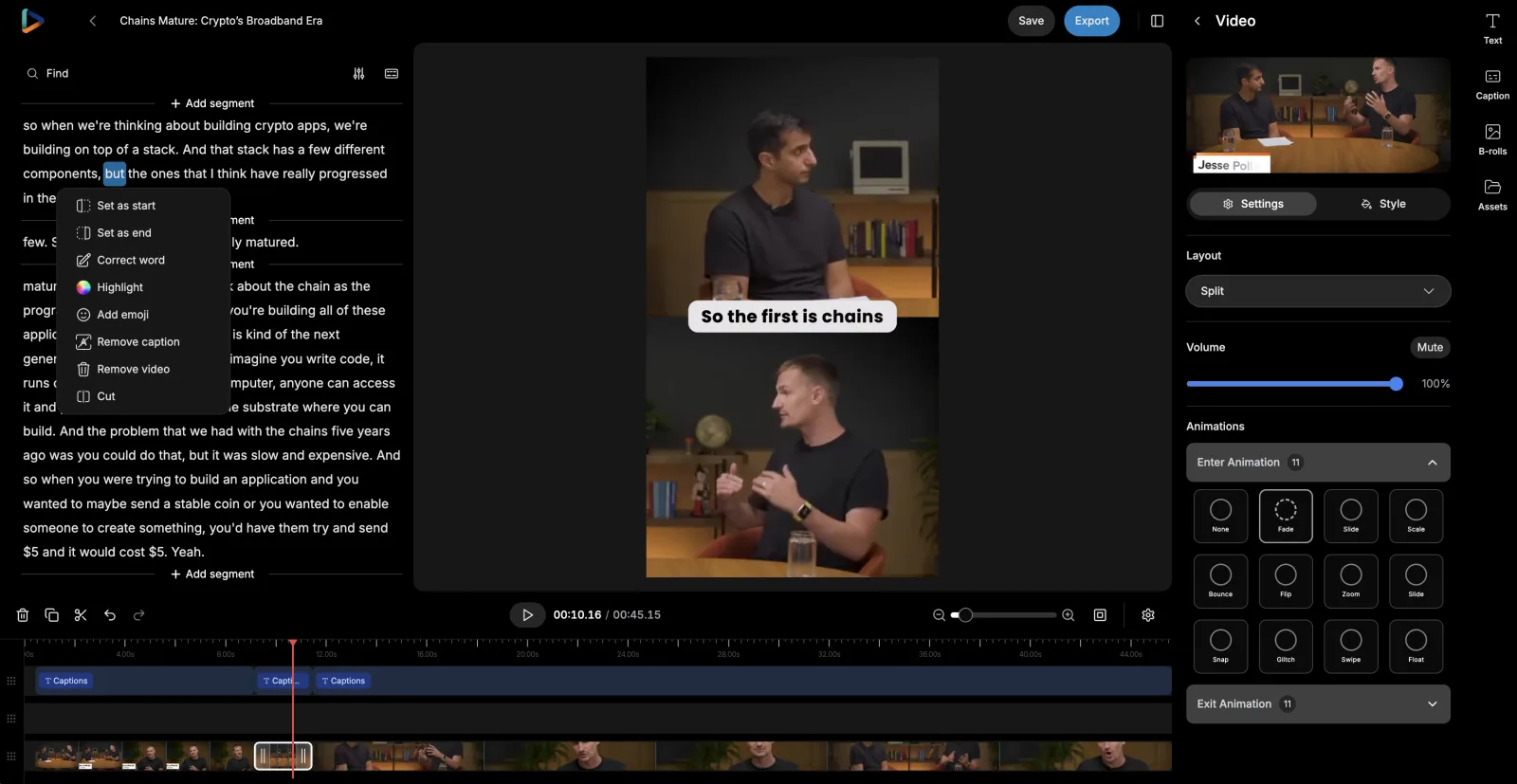
See the AI video editor

reap's editor: the clip transcript on the left with a word selected and its menu open on Set as start, Set as end, Correct word, and Highlight, the captioned preview in the middle, and layout and animation settings on the right
Setting the clip’s start and end from the transcript

Make the message clear without relying on sound.

Most placements start muted. Captions carry the offer, the price, and the proof when the audio never plays.

Read them back before export: brand and product names, prices, discount codes, measurements, statistics, and spoken disclaimers.

Brand templates

Keep every version on-brand.

Recognition is repetition. A brand template saves the look once and applies it as new clips are created.

Q3 campaignBrand template
Caption style
Impact
Font
Brand sans, uploaded
Logo
Top left
Intro / Outro
Opener · End card
Applies to
New clips in this project

Saved once · nobody restyles a cut by hand

A vertical cut carrying the brand's logo and the saved orange caption style
9:16Vertical placements
A square cut of the same clip carrying the same logo and a white-on-blue caption block
1:1In-feed and carousels
A landscape cut of the same clip carrying the same logo and a black-on-yellow caption block
16:9In-stream and landing pages

Templates and fonts are plan-based: 3 on Creator, 6 on Studio, unlimited on Enterprise. A template applies to clips created after it is saved. Read the brand template documentation

reap's auto reframe preparing one recorded frame as landscape, square, and portrait versions, with the subject kept in frame in each
One source, reframed for portrait, square, and landscape

Placement formats

Prepare assets for different placements.

Footage is shot in landscape and watched in portrait. Auto reframe gives you a starting crop to check.

  • Speaker detection and tracking keeps whoever is talking in frame
  • A dynamic layout switch between single-crop, zoom-out, and split framing
  • Portrait, square, and landscape from one recording
  • Manual framing control, and a preview before anything exports

Check the crop when a cut depends on close-ups, on-screen pricing, disclaimers, app interfaces, or comparison tables. How auto-reframing works

More markets

Prepare approved creative for more markets.

Once a cut is approved, translate its captions, output Roman script, or dub the audio, then send that version down the same path.

  1. Approved cut
  2. Transcript
  3. Translated captions
  4. Roman script
  5. Dubbed audio
  6. A fluent review

Each step is a choice, not a chain you have to run in full.

Caption translation

Changes the written text. The cut keeps its original voice, and the captions read in the market's language.

Roman script

Changes how a language is written. Hinglish, Romanized Urdu, Arabizi: captions the way large markets actually read.

AI dubbing

Changes the spoken audio. Approved cuts re-voiced in 80+ languages and regional variants, on a monthly plan allowance.

Have someone fluent read a localized cut, and have the market check the claim. See AI captions and subtitles, multilingual subtitles, and how AI dubbing works

Handoff

Move approved assets into your campaign workflow.

reap takes a recording as far as approved and exported. The buy, the targeting, and the budget stay where they are.

  1. BeforeWhile creative is in reviewFounder on the problem
  2. Week oneAs the campaign opensBenefit, demonstratedCustomer, in their words
  3. Week twoOnce the first cuts have runObjection, answeredThe comparison
  4. AfterKept in the libraryProof point, re-cut
reap's monthly content calendar with clips from one recording scheduled across several days
Organic posts scheduled in reap’s content calendar

Scheduling is organic only: TikTok, Instagram Reels, YouTube Shorts, and LinkedIn on Creator, adding X and Facebook on Studio. Paid assets are an export.

For teams shipping creative every week

Automate the repeatable production steps.

Every campaign means the same steps again. Automated video editing runs them from your own stack, or from an MCP client.

One instruction, whole pipeline
A single ask covers finding angles, reframing, captions, and the campaign brand template. No per-recording setup.
Get told, instead of asking
Register a webhook and reap posts to your endpoint when assets reach a final state. No polling loop to babysit.
Same credits as the dashboard
API, CLI, and MCP draw plan credits 1:1. No separate metering, and no enterprise gate on automation.
One studio, one set of templates
Automated runs draw on the same brand templates and connected accounts your team uses by hand.
Review stays in the loop
Anything an agent starts, a person finishes. No claim reaches a placement without someone approving it.

Video editing API, MCP server, and the clipping agent

  • Claude
  • Cursor
  • ChatGPT
  • VS Code
  • OpenClaw

Keep the creative judgment. Drop the rebuilding.

A video ad maker does not decide which claim is worth making. It removes the work stacked around that call.

TaskDoing it by handWith reap
Finding anglesRewatch the whole recording and document timestamps.Generate candidate clips from the objective you describe, then review them.
EditingCut every version separately on a timeline.Start from editable candidate clips and adjust the boundaries.
CaptionsTranscribe and style each asset individually.Generate editable captions and apply a reusable preset.
FormatsRebuild the asset for each aspect ratio a placement wants.Create the supported formats from one source, then check the crop.
BrandingReapply the styling to every version.Save it once as a brand template and apply it as clips are created.
LocalizationMove between separate transcription, translation, and dubbing tools.Produce supported language versions in the same workflow.
DeliveryTrack exports and files across separate tools.Export the approved set, or pull finished projects back through the API.
Testing the creativeSet it up in the ad platform.Same. reap produces the versions; it does not test, measure, or buy.

One workflow, used differently by every kind of team.

The same clipping, captioning, and branding workflow, pointed at whatever each of them is selling.

Paid social teams

One interview cut into a problem-led, a benefit-led, and an objection-handling version, each in the ratios the placements need, then exported for the buy.

Creative strategists

Write the angle as the objective, review what comes back against the brief, and keep the ones that actually say what you meant.

Performance marketers

Performance creative needs a steady supply of new cuts, and footage you already paid for makes the next one a production job rather than another shoot.

E-commerce advertisers

Demos, unboxings, and reviews turned into short assets, with prices, sizes, and discount codes checked in the transcript before export.

App marketers

A screen-recorded walkthrough split into the setup, the core action, and the feature nobody knows about, with the crop checked over the interface.

Brand advertisers

Campaign footage and the interviews around it, cut down and held to one saved template so every placement still looks like the same brand.

Advertising agencies

A shared Team Studio on the Studio plan, with a brand template per client and one place the account team works from.

Creative operations

The same production steps every week, run through the API or an MCP client, with a person on the end of every run.

Direct-response teams

The spoken call to action, the offer, and the proof point pulled out as separate cuts, each checked against what is still live.

Growth teams

Creator and customer footage, cleared for paid use, cut into short assets for the channels you are testing this quarter.

Built with reap.

Creative production automation works best as one system, so every step here is a capability with its own page.

Frequently Asked Questions

Anything already recorded and cleared for advertising use: product demonstrations, customer testimonials and interviews, creator and UGC-style footage, founder videos, app walkthroughs, product reviews, webinars, podcasts, live-shopping sessions, event and brand campaign footage. To turn videos into clips, upload the file or import a link from YouTube, Twitch, X, or Vimeo, so you repurpose videos you already own rather than shooting again. Paid plans clip sources up to 180 minutes, with uploads up to 5 GB on Free and 10 GB on paid plans. reap starts from the finished recording, so it does not shoot, script, or generate footage, and it does not create an ad from a product page or a prompt alone.

You can start free: the Free plan includes 1 hour of processing, with watermarked 720p exports in 9:16. Watermark-free exports and landscape and square versions start on Creator at $9.99/mo. Teams use it as a Facebook ad video maker, a TikTok ad editor, or an ads maker for YouTube placements: reap makes the video creative, and you upload it to the ad platform yourself.

Yes, and that is the shape it is built for. It is not a video ad maker that generates a spot for you; it works from the recording you already have, starting from what was said, so the hook, the demonstration, the objection you answer every week, and the customer's own words are all findable inside a long file. There are genre-specific models for talking head and presentation content. How many usable clips a recording yields depends on the recording, so reap promises no fixed number from any source.

Yes. Prompt-first clipping is available on paid plans, so you describe the objective instead of relying on generic highlight detection: the strongest opening statement about the customer problem, the clearest demonstration of the main benefit, the reason a customer switched, or the response to a common objection. reap searches what is in the recording rather than inventing it. Because it works largely from spoken content, a silent visual sequence gives it much less to go on, so treat everything it returns as candidates rather than finished creative.

Yes. One interview or demo can produce a problem-led cut, a benefit-led cut, an objection-handling cut, and a proof-led cut, each in the aspect ratios your placements need, with captions and, where you want them, translated or dubbed language versions. These are creative directions you choose and review, not automatically optimised ad variants. reap does not decide which version is stronger, rotate them, or retire one for fatigue.

Yes, and you should. Every suggested clip opens in reap's video ad editor, where you can move the start and end points, correct the transcript, cut sections, restyle and reposition captions, adjust the framing, and add text overlays before anything is exported. AI produces the first pass. Whether the claim is accurate, complete, and safe to run stays with your team.

You can correct anything in the transcript, and the correction carries into the burned-in captions. Plan for it: brand and product names, prices, discount codes, offer terms, measurements, statistics, customer names, technical terms, and spoken disclaimers are where transcription slips most. reap does not guarantee perfect transcription, and it does not check whether a price is current, an offer is still live, a disclosure is required, or a claim is true. Those checks are yours to run before the asset leaves the editor.

Yes, through brand templates. A template saves a caption preset, uploaded fonts, a logo overlay, and intro and outro cards, then applies them as new clips are created. Font and template counts are plan-based: 3 on Creator, 6 on Studio, unlimited on Enterprise. A template applies to clips created after it is saved, so it does not restyle assets you already exported. There is no template locking, brand auditing, automatic compliance enforcement, dynamic price or offer insertion, or automatic call-to-action overlay.

Paid plans output 9:16, 16:9, and 1:1 from the same source; the free plan outputs 9:16 only. Auto reframe uses speaker detection and tracking, with a dynamic layout switch between single-crop, zoom-out, and split layouts, and you can set the framing by hand. Review the crop before export: product close-ups, on-screen pricing, comparison tables, app interfaces, split-screen footage, disclaimers, and brand marks can all sit outside the frame reap chooses, and it does not know which of them your creative depends on.

Subtitle translation covers 100+ languages on paid plans, with Romanized script output for languages such as Hinglish, Romanized Urdu, and Arabizi. AI dubbing covers 80+ languages and regional variants on a monthly allowance: 2 hours on Creator and 5 hours on Studio. Caption translation changes the written text only; dubbing changes the spoken audio. Machine translation does not replace a native-language reader, and it does not replace legal or market review of a claim, a price, an offer, or a regulated term in a new market.

Yes, and they are your responsibility rather than a product setting. reap has no rights, consent, or release management. Creator and UGC footage needs paid-media usage rights, not just permission to post organically. Customer testimonials need consent for advertising use, licensed music needs commercial rights, and footage involving minors needs the appropriate authorisation. Check that a shortened clip still represents what the person actually said, and that the offer, price, and claim inside it are still current.

No. reap publishes organic posts to connected social accounts only: TikTok, Instagram Reels, YouTube Shorts, and LinkedIn on Creator, adding X and Facebook on Studio. It does not connect to an ad account, upload creative into an ad platform, create a campaign, set targeting, manage budgets or bids, or submit anything for ad review. Approved assets are exported as MP4 files and taken into whatever ad platform you already buy through.

No. There is no Meta Ads, Google Ads, TikTok Ads, YouTube Ads, or Amazon Ads integration, and no creative-testing platform connector. What exists is a verified Zapier integration, which needs a paid plan and an API key from your reap dashboard, with triggers for a new project or new upload and actions for clips, captions, transcription, dubbing, and reframing, plus a REST API, a CLI, an MCP server, and webhooks. Those are the layers you would build a route into an ad platform through yourself.

No. reap produces versions; it does not test them. There is no built-in experiment framework, no split-test setup, no automatic winner selection, no dynamic creative optimisation, and no creative-fatigue detection. Export the cuts you want to try and run the test in the platform that serves them, which is also the only place that can see the result.

No. There is no ad-performance reporting, conversion tracking, attribution, or return-on-ad-spend measurement anywhere in reap, and nothing in it predicts how a piece of creative will perform in a paid placement. It produces and schedules video. Measurement stays in your ad platform and your analytics stack.

The Team Studio workspace is on the Studio plan, with up to 3 member seats, Admin and Member roles, and shared projects so brand templates, assets, and the calendar live in one place. Enterprise adds unlimited seats and SSO. Free and Creator are single-seat. There are no formal approval stages, client-review portals, or comment threads, so sign-off on a claim is a step your team owns rather than one the product enforces.

No, and it should not be read as making that claim anywhere. reap is a production tool: as a video ad creator it removes the repetitive work between a recording and a finished asset, which is finding candidate moments, cutting, captioning, reframing, restyling, and preparing language versions. Whether a piece of creative performs depends on the offer, the audience, the placement, the auction, and the idea. Deciding which angle is worth running, and whether the claim inside it is accurate and compliant, is human work.

The next angle is already in the footage.

Get more creative directions from the footage you already have

Find campaign-relevant moments, refine every cut, keep the brand consistent, and prepare approved assets for downstream advertising workflows. Plans are on the pricing page.

Create ad-ready clipsSee how clipping works