reap for e-commerce
Make every product video work harder.
Turn product demos, reviews, testimonials, unboxings, tutorials, and live-shopping recordings into branded ecommerce video clips through one connected workflow.
One recording in. The demo, the objection, and the proof out, each reviewed by you.


One product video. Every clip a listing needs.
- Demo clips From your walkthrough
- Review cuts Used with permission
- Unboxing cuts In-house or licensed
- Founder cuts From the founder video
- Tutorial clips From a setup guide
- Live-shopping cuts From a recorded session
- Localized versions 100+ caption languages
Captions, translation, and dubbing are paid-plan capabilities. Every clip opens in the editor before it goes anywhere.
One product video. Used once.
A single demo holds the feature explanation, the objection you answer daily, and the proof that closes the sale. Most brands publish it whole, then move on.
- Find the recording and work out who has the file
- Rewatch it to remember what was actually demonstrated
- Note the timestamps worth keeping
- Cut each clip on its own
- Fix the product and model names transcription got wrong
- Check the price and the offer are still current
- Reapply the brand's fonts, colours, and logo
- Rebuild it for every format a channel wants
- Write the posts and queue them up
The usual route
- Shoot ends, recording sits in a drive
- Rewatch it to place the moments
- Write the editing instructions
- Cut, caption, and restyle each clip
- Rebuild it for every format
- Post them one at a time
With reap
- Shoot ends, recording goes in
- Say what you need the clip to show
- Review the moments it comes back with
- Refine the ones worth keeping
- Brand template and formats applied
- Export or schedule the approved set
One recording, many product assets
Made for every kind of product story.
A 42-minute demo is not one video. It is an overview, a comparison, a setup walkthrough, and the answer to the question support fields every week.

Product demo

Live shopping

Unboxing

Founder video

Customer review

Customer testimonial
Sources go in as an upload or a link from YouTube, Twitch, X, or Vimeo, up to 180 minutes on paid plans.
Explore AI video clippingPrompt-first clipping
Find the moments that explain why the product matters.
Describe the objective instead of scrubbing a timeline. reap works from what was said and returns moments you can look through.
- Find the clearest demonstration of the main feature.
- Extract the answer to the most common setup question.
- Find where the presenter compares the two options.
- Create three clips from this live-shopping recording.
- Find the founder's explanation of why we made it.
reap works largely from spoken content, so a silent visual demonstration gives it less to go on. How AI clipping works
Your call, every time
Control every product claim before it goes live.
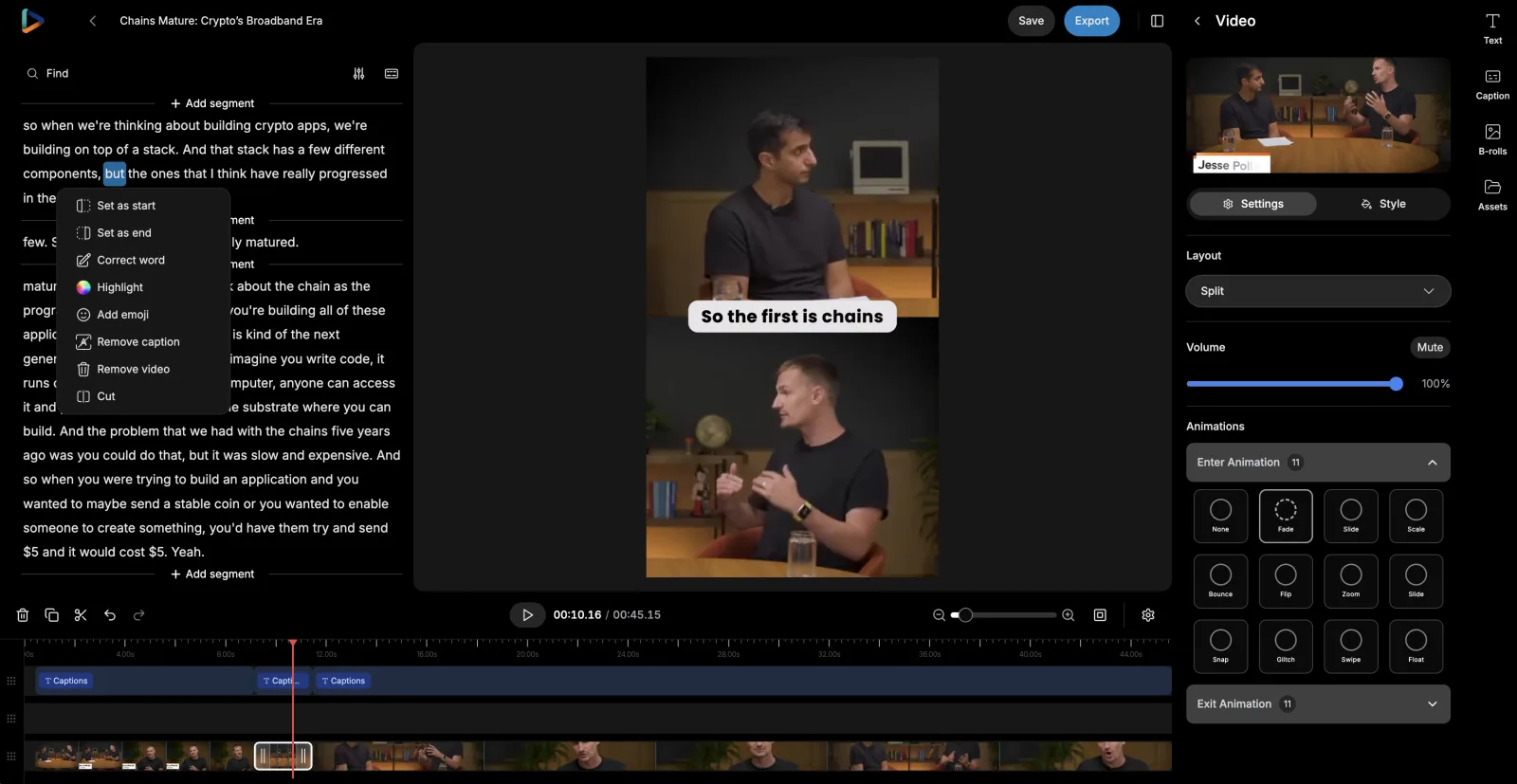
A suggested clip is a draft. It opens in reap’s e-commerce video editor, and trimming means selecting words.
- Move the in and out points until the clip starts on the right word
- Fix a product or model name in the transcript, and the captions follow
- Restyle, resize, and reposition captions off the part of the frame that matters
- Add text overlays, then preview the clip before it leaves reap
The claims, the rights, and the final approval stay with your brand. See the AI video editor

Make product details easier to follow.
Short-form video content is watched muted. Captions carry the size, the material, and the price when the audio never plays.
Check the details transcription gets wrong: product and model names, measurements, materials, prices, discount codes, and customer names.
Brand templates
Keep every product clip unmistakably on-brand.
Recognition is built from repetition. A brand template saves the look once and applies it as new clips are created, across product lines and formats.
- Caption style
- Impact
- Font
- Brand sans, uploaded
- Logo
- Top left
- Intro / Outro
- Opener · End card
- Applies to
- New clips in this project
Saved once · nobody restyles a product clip by hand


Templates and fonts are plan-based: 3 on Creator, 6 on Studio, unlimited on Enterprise. A template applies to clips created after it is saved. Read the brand template documentation

Channel formats
Prepare each product story for the way people watch.
A demo is shot in landscape and watched in portrait. Auto reframe produces a starting crop for each format, and you check it.
- Speaker detection and tracking keeps whoever is talking in frame
- A dynamic layout switch between single-crop, zoom-out, and split framing
- Portrait, square, and landscape from one recording
- Manual framing control, and a preview before anything exports
Review the crop when a clip depends on close-ups, on-screen pricing, comparison tables, or before-and-after shots. How auto-reframing works
More markets
Prepare approved product videos for more markets.
Once a clip is approved, translate its captions, output Roman script, or dub the audio, and send that version down the same path.
- Approved clip
- Transcript
- Translated captions
- Roman script
- Dubbed audio
- A fluent review
Each step is a choice, not a chain you have to run in full.
Caption translation
Changes the written text. The clip keeps the original voice, and the captions read in the buyer's language.
Roman script
Changes how a language is written. Hinglish, Romanized Urdu, Arabizi: captions the way large markets actually read.
AI dubbing
Changes the spoken audio. Approved clips re-voiced in 80+ languages and regional variants, on a monthly plan allowance.
Have someone fluent read a localized clip before it ships. See AI captions and subtitles, multilingual subtitles, and how AI dubbing works
Distribution
Keep product content moving after launch day.
A launch is not one post. Spread the clips across the weeks either side of it, from the founder teaser to the customer story.
- Pre-launchBefore it is buyableFounder on why it exists
- LaunchThe day itselfProduct overviewOne feature, demonstrated
- Post-launchThe weeks afterSetup walkthroughThe question you get most
- OngoingOnce it is in the rangeApproved customer story

Publishing goes to connected social accounts: TikTok, Instagram Reels, YouTube Shorts, and LinkedIn on Creator, adding X and Facebook on Studio. Everything else is an export.
For catalogues that keep shipping
Build a repeatable product-content workflow.
Every new product means the same work again. Automated video editing runs it at three levels, and different product lines can sit on different ones.
In the reap dashboard
For a small team, or for a product that only launches once.
- Add the recording, describe what you are after, pick the brand template
- Review the suggested moments and refine them in the editor
- Export the clips, or schedule them to a connected account
A no-code connection you build
For a catalogue where the same recording job repeats per product.
- Triggers: a new project or a new upload in your reap studio
- Actions: create clips, captions, transcription, dubbing, or a reframe
- Read project status, details, and clips back to drive the next step
Developer and agent workflows
For a brand with engineering help, or an agent already in the loop.
- REST API and CLI to submit recordings and collect finished clips
- Webhooks so you get told when a project finishes, instead of polling
- MCP server, so an agent can run the job in plain language
What automation actually removes
An MCP client is a chat window: attach a recording, describe the objective, get the same reviewable clips the dashboard produces.
- One instruction, whole pipeline
- A single ask covers finding moments, reframing, captions, and the brand template. No per-product setup.
- Get told, instead of asking
- Register a webhook and reap posts to your endpoint when clips reach a final state. No polling loop to babysit.
- Same credits as the dashboard
- API, CLI, and MCP draw plan credits 1:1. No separate metering, and no enterprise gate on automation.
- One studio, one set of templates
- Automated runs draw on the same brand templates and connected accounts your team uses by hand.
- Review stays in the loop
- Anything an agent starts, a person finishes. No product claim reaches a channel without someone approving it.
Video editing API, MCP server, and the clipping agent
Claude
CursorChatGPT
VS Code
OpenClaw
One repeatable product-content workflow, end to end
A product recording goes in, reviewable clips come out. The first five nodes are published reap Zapier steps; the last one is the part that stays with your brand. Drag the nodes to explore the pipeline.
The approved product recording lands in your studio
Product moments for the objective you described
100+ languages, your saved caption style
9:16, 16:9, and 1:1 from one recording
80+ languages for more markets
Approve the claims, then schedule or export
Drag nodes to explore the pipeline
Keep the product knowledge. Drop the rebuilding.
A video repurposing tool does not decide which claim is worth making, or whether a shortened testimonial is still fair. It removes the work stacked around those calls.
| Task | Doing it by hand | With reap |
|---|---|---|
| Finding moments | Rewatch the whole demo and write down timestamps. | Generate candidate moments from the objective you describe, then review them. |
| Editing | Cut every clip separately on a timeline. | Start from editable AI-generated clips and adjust the boundaries. |
| Captions | Transcribe and style captions on every clip individually. | Generate editable captions and apply a reusable preset. |
| Branding | Reapply the brand's fonts, colours, and logo to every export. | Save it once as a brand template and apply it as clips are created. |
| Formats | Rebuild the video for each aspect ratio a channel wants. | Create the supported formats from one source, then check the crop. |
| Other markets | Move between separate transcription, translation, and dubbing tools. | Produce supported language versions in the same workflow. |
| Publishing | Download files, organise them, and schedule them somewhere else. | Export, or schedule approved clips to connected accounts from the calendar. |
| Checking claims | Someone reads every cut and hopes nothing slipped. | Same. reap does not verify a claim, a price, or an offer. |
One workflow, used differently by every kind of brand.
The same clipping, captioning, and publishing workflow, pointed at whatever each of them sells.
DTC brands
One demo recorded per product becomes the overview, the feature explanation, and the answer to the question support gets every week.
Online retailers
A catalogue of ranges, each with its own brand template, so clips for two very different lines still leave looking like one retailer.
Marketplace sellers
Portrait, square, and landscape cuts of the same walkthrough, exported and uploaded wherever each listing needs them.
Founder-led brands
The unscripted founder video you record once, cut into the origin story, the design decision, and the reason the range exists at all.
Social-commerce teams
A long live-shopping recording split into the introduction, the demonstration, the audience question, and the recap, then scheduled out across the week.
Product marketing teams
Set the objective for a launch, review what comes back, and keep the positioning language identical across every cut of the same demo.
Brand social teams
A saved caption style and logo placement, so the feed stays recognisable whether the clip came from a founder video or a tutorial.
Retail media teams
Several cuts of one product story prepared in the formats a placement calls for, then exported for whoever runs the buy.
E-commerce content teams
Approved reviews and testimonials cut into short pieces, each checked against what the customer actually agreed to.
E-commerce agencies
A shared Team Studio on the Studio plan, with a brand template per client and one calendar the whole account team works from.
Built with reap.
Content repurposing software works best as one system, so every step of this workflow is a capability with its own page rather than a tool you stitch together.
AI video clipping
Turns a demo, review, unboxing, or live-shopping recording into candidate moments to look through.AI captions
Carries the spec in muted feeds: animated presets, 100+ languages, native and Roman scripts.AI video editor
Where you take over: move the in and out points, fix a product name in the transcript, check the crop.Clipping agent
Runs the recording-to-reviewable-clips loop from one instruction, so a new product does not need setting up.Video editing API
Puts clipping in your own stack: submit the recording, set the genre, collect the results.AI dubbing
Re-voices an approved clip in 80+ languages, so a product explanation reaches past one market.Social scheduler
Queues the rollout from one recording: pick the account, write the copy, set the time.MCP server

Lets Claude, Cursor, or any MCP client run a product clip job in plain language.Frequently Asked Questions
Anything already recorded: product demos and walkthroughs, tutorials and setup guides, live-shopping recordings, unboxings, founder videos, launch events, webinars, behind-the-scenes footage, and approved customer reviews, testimonials, and interviews. As a video repurposing tool it starts from the finished recording, so to repurpose product videos you upload the file or import from YouTube, Twitch, X, or Vimeo. Paid plans clip sources up to 180 minutes, with uploads up to 5 GB on Free and 10 GB on paid plans. reap does not shoot, host, or produce the recording itself.
Yes, as finished clips. reap works as a product video maker and product demo video maker: it cuts demos, reviews, and unboxings into vertical, captioned TikTok Shop videos you can schedule to TikTok or export as MP4. It has no TikTok Shop integration, so it does not tag products, link listings, or publish into the Shop itself: you add the product link in TikTok.
Yes, and turning long videos into shorts is the shape reap is built for. It is not a product demo video maker that generates a demo for you; it works from the demo you already recorded, starting from what was said, so the feature explanation, the setup walkthrough, the comparison, and the question you answer every week are all findable. There are genre-specific models for talking head and presentation content. How many usable clips a recording yields depends on the recording, so reap does not promise a fixed number from any source.
Yes, on the same terms as any other recording, and the rights are your responsibility rather than a product setting. reap has no consent or release management. Use footage a customer or creator has agreed can be used in marketing, keep the quote in context, and check that a shortened clip still represents what the person actually said. Licensed music, creator collaborations, and footage of minors all need the appropriate permissions before anything is cut.
Yes. Prompt-first clipping is available on paid plans, so you can describe the objective instead of relying on generic highlight detection: the clearest demonstration of a feature, the answer to the most common setup question, or the moment a presenter compares two options. reap searches what is in the recording rather than inventing it. Because it works largely from spoken content, a silent visual demonstration gives it much less to go on, so treat everything it returns as candidates.
Yes, and you should. Every suggested clip opens in reap's editor, where you can move the start and end points, correct the transcript, cut sections, restyle and reposition captions, adjust the framing, and add text overlays before anything is exported or scheduled. AI produces the first pass; whether the claim is accurate, complete, and safe to publish stays with your brand.
Yes. The transcript is editable, and a correction there carries into the burned-in captions. Plan for it: product and model names, measurements, materials and ingredients, prices, discount codes, technical terminology, customer names, and numbers are where transcription slips most. reap does not guarantee perfect transcription, and it does not check whether a price is current, an offer is still live, or a claim is true.
Yes, through brand templates. A template saves a caption preset, uploaded fonts, a logo overlay, and intro and outro cards, then applies them as new clips are created. Font and template counts are plan-based: 3 on Creator, 6 on Studio, unlimited on Enterprise. A template applies to clips created after it is saved, so it does not restyle videos you already exported. There is no automatic brand compliance, template locking, dynamic price or discount insertion, or automatic call-to-action overlay.
Paid plans output 9:16, 16:9, and 1:1 from the same source; the free plan outputs 9:16 only. Auto reframe uses speaker detection and tracking, with a dynamic layout switch between single-crop, zoom-out, and split layouts. Review the crop before export: product close-ups, on-screen pricing, comparison tables, screen recordings, text labels, and before-and-after shots can all sit outside the frame reap chooses, and it does not know which of them your clip depends on.
Subtitle translation covers 100+ languages on paid plans, with Romanized script output for languages such as Hinglish, Romanized Urdu, and Arabizi. AI dubbing covers 80+ languages and regional variants on a monthly allowance: 2 hours on Creator and 5 hours on Studio. Caption translation changes the written text only; dubbing changes the spoken audio. Machine translation does not replace native-language review, and it certainly does not replace legal or regulatory review of a product claim, a measurement, a price, or a safety instruction in a new market.
Yes. Paid plans include the social media publisher and a content calendar, so you can pick a connected account, write the post copy, set the date and time, and see the week or month laid out. A bulk scheduler places several clips from one recording at once, and the Studio plan adds AI-suggested posting times. The Creator plan publishes to TikTok, Instagram Reels, YouTube Shorts, and LinkedIn; Studio adds X and Facebook. Anything else is an MP4 export you hand to another tool.
No. There are no native Shopify, Amazon, WooCommerce, TikTok Shop, product-information, Google Drive, Dropbox, Slack, or Notion integrations, and there is no product-feed synchronisation. What exists is a verified Zapier integration, which needs a paid plan and an API key from your reap dashboard, with triggers for a new project or new upload and actions for clips, captions, transcription, dubbing, and reframing, plus a REST API, a CLI, an MCP server, and webhooks. Those are the layers you would build a store connection through yourself.
No. reap outputs video files. It has no shoppable-video player, no product tagging, no checkout, no cart, and no social-commerce storefront. Clips are exported as MP4 or scheduled to a connected social account, and anything that turns a video into a buyable surface happens in the platform or storefront you publish to.
No. Publishing goes to organic posts on connected social accounts only. reap does not connect to an ad account, upload creative to an ad platform, manage a media buy, or predict how an ad will perform. You can export as many cuts of a product story as you want and run them as ads elsewhere, but the testing and the buying happen in the ad platform, not in reap.
No. There are no sales analytics, social analytics, conversion tracking, attribution, or return-on-ad-spend reporting anywhere in reap, and no built-in A/B testing or automatic selection of a winning variant. It produces and schedules video. Measurement stays in whatever you already use for it.
The Team Studio workspace is on the Studio plan, with up to 3 member seats, Admin and Member roles, and shared projects so brand templates, assets, and the calendar live in one place. Enterprise adds unlimited seats and SSO. Free and Creator are single-seat. There are no formal approval stages or client-review portals, so the sign-off on a product claim is a step your team owns.
No. reap is not a product video maker in the sense of generating footage, and it is not a substitute for the people who decide what to shoot. As a content repurposing tool and a product video clip maker it removes the repetitive production steps between a recording and a publishable clip: finding candidate moments, cutting, captioning, reframing, restyling, and preparing language versions. Deciding which moment is worth publishing, whether a claim is accurate and complete, and whether a shortened testimonial is still fair is human work, and the editor is where that judgment gets applied.
The next clip is already in the recording.
Get more content from every product video
Find the strongest product moments, refine every clip, keep the brand consistent, and prepare approved content for publishing. Plans are on the pricing page.
Create product clipsSee how clipping works