Clipping agent
Tell a clipping agent what to do with your long video
Paste a long video and ask for the clips you need. reap finds the moments, adds captions, reframes for vertical, and can schedule the posts to TikTok, Reels, and Shorts.
 Claude
 Cursor
 ChatGPT
 VS Code
 Gemini CLI
Real output, not a rough cut
From prompt to publish-ready
Speaker tracking, styled captions, and social-first framing are handled before review.





What is a clipping agent?
A clipping agent is software that takes a long-form video plus an instruction, finds the strongest moments, and returns captioned, publish-ready clips reframed to a vertical aspect ratio without manual editing.
The difference from a clipping tool is who operates it. A tool needs a person in the dashboard; an agent takes a plain-language goal from a chat window, a script, or an AI assistant over MCP, and runs the whole clip-to-publish workflow, scheduling included.
Input
A long video. Paste a YouTube link or upload a file. reap clips sources up to 180 minutes.
Instruction
Plain language.“Find the 5 strongest moments about pricing, caption them, schedule one per day at 9am.”
Output
Publish-ready clips. Captioned in any of 100 languages, reframed to 9:16, scored, and scheduled, or returned over the API.
Connect once, then ask for the clips you need
The agent lives where the work already starts: your assistant, your terminal, or your backend.
Connect your stack
Add reap to Claude, Cursor, VS Code, or your backend with MCP or the API. No new editing workspace.
Ask for finished clips
Tell it the topic, count, language, and format. reap picks moments, cuts clips, applies captions, and reframes.
Review or schedule
Get scored, captioned clips back in minutes, then export them or fill the calendar.
Use chat, code, or the command line
MCP for assistants, API for products, CLI for scripts. All three use the same plan credits as the dashboard, 1:1, from $9.99/mo.
{
  "mcpServers": {
    "reap": {
      "url": "https://mcp.reap.video/mcp"
    }
  }
}
Same config shape for Claude Desktop, Cursor, VS Code, and Windsurf; in Claude Code it’s one command: claude mcp add reap https://mcp.reap.video/mcp. Client-by-client steps in the MCP docs.
Clipping agent vs clipping tool
A clipping tool is useful when you want to click through a dashboard. A clipping agent is better when the same job happens every week and should run from a prompt or script. Numbers below come from our April 2026 test of 9 paid tools.
| Capability | Clipping agent reaprecommended | Traditional clipping tool |
|---|---|---|
| Works from a prompt | Yes. Use plain language in any MCP client, or pass topics on the API call. | Partly. Most tools pick clips, and OpusClip's ClipAnything takes prompts, but a person still drives the dashboard for each video. |
| Runs in your agent stack (MCP) | Native MCP server with 10 tools and 5 documented clients, included from $9.99/mo. | No other tool in our April 2026 test had a native MCP server. |
| End-to-end: captions, reframe, schedule | One instruction covers clip, caption (100 languages), 9:16 reframe, and schedule. | Usually separate steps, with scheduling handled in another product. |
| API parity with your plan | API, CLI, and MCP draw the same plan credits, 1:1. No separate metering. | APIs are commonly gated to business tiers or billed separately from the subscription. |
| Human time per video | Write the instruction once, review the output. | A person opens the dashboard for every video: review, trim, style, export, post. |
Good fits for a clipping agent
The pattern is simple: recurring long-form video, a known output format, and a workflow that should not depend on one person clicking export.
Podcast back-catalog
A podcast backlog should not become a spreadsheet. Script it against the API: submit each episode, poll for status, and collect captioned 9:16 clips. Sources up to 180 minutes go in whole.
Sources up to 180 min
Webinar repurposing
When a webinar ends at 11, clips can be live by lunch. From Claude or Cursor over MCP, ask: “clip yesterday’s webinar, caption it, schedule this week at 9am” returns the first clip in 4–5 min.
First clip in 4–5 min
Agency client pipelines
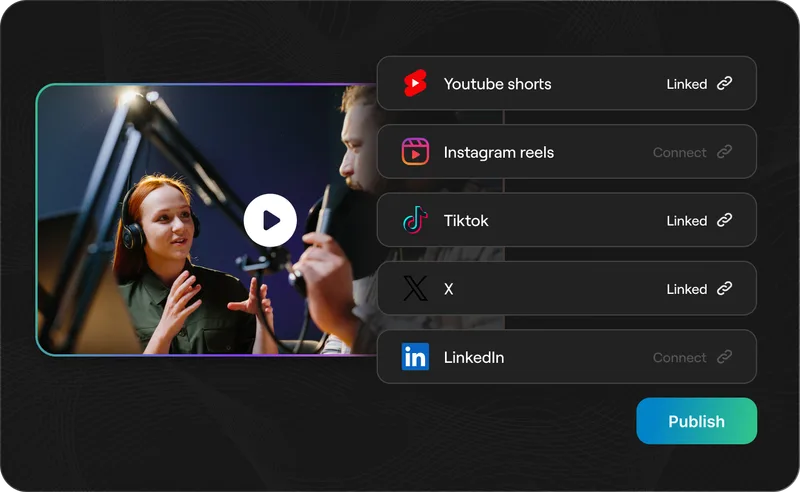
Give each client a studio and reuse the same prompt for each content drop. The scheduler books up to 100 posts per studio per day across TikTok, Reels, Shorts, LinkedIn, and Facebook.
900 posts/studio/day
Dev and product integrations
Put clipping inside your own product. The REST API follows submit-poll-retrieve, runs at 10 requests/minute per key, and shares credits 1:1 with the dashboard. Details are in the API docs.
Credits shared 1:1 with the dashboard
The same engine as the reap dashboard
The agent isn’t a separate product. Every instruction runs the pipeline behind reap’s clipping tool: the clips, captions, and scheduled posts land in the same studio your team already reviews.
- Clips arrive scored, captioned, and reframed — open any of them in the AI video editor to tweak before they go out.
- Scheduling posts to TikTok, Reels, Shorts, LinkedIn, and Facebook from the same calendar the dashboard uses.
- Anything the agent starts, a human can finish — and the other way around.
Frequently asked questions
A clipping agent is software that takes a long-form video plus an instruction, finds the strongest moments, and returns captioned, reframed, publish-ready clips without manual editing. Unlike a clipping tool, which a person operates through a dashboard, a clipping agent can be driven by a prompt, an API call, or an AI assistant connected over MCP, including scheduling.
The difference is how the work starts. A clip maker tool needs a person in the dashboard for every video, while a clipping agent can take instructions from software. reap exposes clipping, captioning, reframing, publishing, and scheduling through a REST API, a CLI, and a native MCP server, all included from the $9.99/mo Creator plan. OpusClip stays strong at visual-scene clipping, but its API access sits on the Business plan and we found no native MCP server in the plans tested for April 2026.
Any MCP client works. reap documents setup for Claude Desktop, Claude Code, Cursor, VS Code, and Windsurf. ChatGPT or any other assistant with MCP connector support can use the same server URL: https://mcp.reap.video/mcp. The server exposes 10 tools covering clip creation, captions, reframing, publishing, and scheduling.
reap publishes to TikTok, Instagram Reels, YouTube Shorts, LinkedIn, and Facebook, and the scheduler books up to 100 posts per studio per day on the Studio plan. Platform-native daily limits still apply, like TikTok's cap of around 15 posts per day per account, but one instruction can still fill a week's calendar.
The free plan includes 1 hour of processing, enough to test the full prompt-to-scheduled-clip workflow. Creator is $9.99/mo billed yearly with 600 credits and API, CLI, and MCP access included. Studio is $29/mo with 20 hours of clipping, 10 API keys, and 100 posts per day of scheduler throughput. Credits are shared 1:1 across the dashboard, API, CLI, and MCP, with no separate agent billing.
The REST API is available on every paid tier from $9.99/mo and follows a submit-poll-retrieve pattern: POST a video URL to /v1/automation/clips, poll status, fetch the finished clips. Each key runs at 10 requests per minute, API credits are the same credits the dashboard uses, and the reap CLI (npm install -g reap) covers terminal and CI workflows.
Put reap on your clipping workflow
The free plan includes 1 hour of processing, enough to run the full prompt-to-scheduled-clip loop on a real video. Creator is $9.99/mo with API, CLI, and MCP included; plans on the pricing page.
Try reap freeRead the MCP docs