Your latest podcast episode contains a story you keep thinking about. The guest describes a mistake, explains what changed and offers advice your audience could use immediately.
Then the promotional post goes out: “New episode available now.”
Someone who already follows the show may know why that matters. Everyone else needs a reason to care about this particular conversation.
Threads is giving podcasters more ways to make that connection. On September 16, 2026, Meta announced an expanded podcast toolkit for the platform. Source: Meta’s announcement.
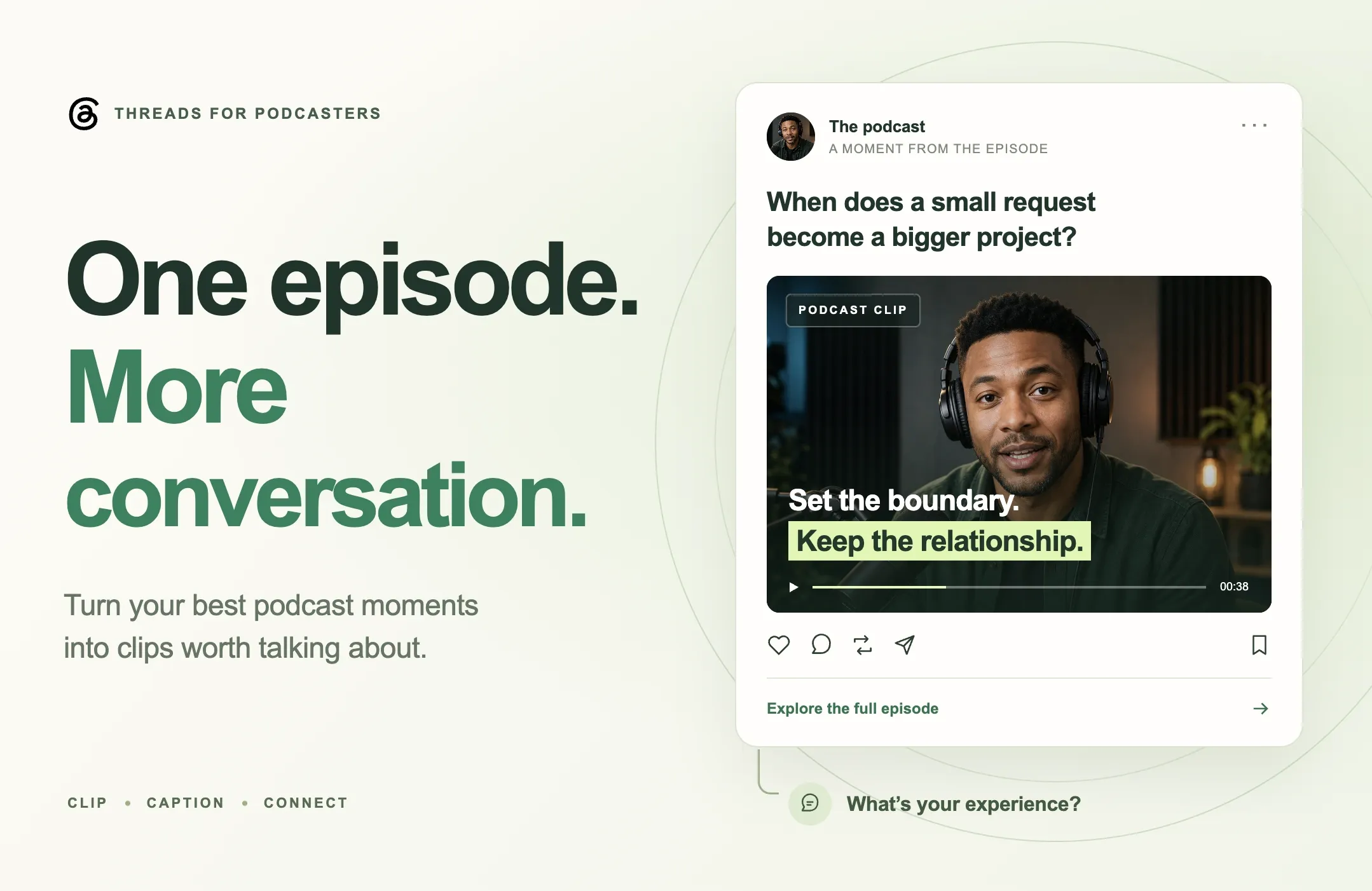
For creators, the opportunity starts with the material inside the episode. A clear video excerpt can introduce the guest’s perspective, answer a specific question and give people something worth discussing.
Here is how to promote a podcast on Threads with short video clips, prepare those clips in Reap and connect each post to a useful next step.
Quick Answer: How Can You Promote a Podcast on Threads?
Choose a passage that delivers one complete idea. Edit it into a short, understandable video, add accurate captions and write a post that explains why the moment matters. Give interested viewers a clear route to the relevant episode.
Use Reap AI Clipping to prepare candidates from your recording, then review the edit before exporting. For the workflow in this guide, upload the finished file to Threads manually.
Start with a small set of distinct ideas from one episode. Learn from the questions people ask and the actions they take before deciding how much content to produce next.
What Changed for Podcasts on Threads?
Meta’s September update introduces podcast banners, an episode picker and tappable episode-link cards. It also adds transcript, video and guest-card posts, episode saves, creator reminders to share new episodes, and Podcast Insights covering reach, engagement, clicks and saves. Source: Threads podcast toolkit.
The announcement describes a rollout. Check which tools appear in your account; it does not provide a complete country-by-country availability list. Its reminders prompt creators to share episodes, rather than publishing for them automatically.
That gives you several ways to present a conversation. The editorial decision is which part will be useful to someone encountering the show for the first time.
A practical starting point is to separate the episode’s subject from the question a potential listener is asking. “An interview with a freelance designer” is a subject. “How do you stop a small project from becoming unpaid extra work?” is a question someone might recognize immediately.
Choose a clip that answers the question, then use the surrounding post to connect that answer to the larger discussion.
Choose a Podcast Clip That Starts a Useful Conversation
The loudest moment in an interview is not always the best promotional excerpt. Look for a passage that rewards the viewer’s attention and leaves room for a meaningful response.
A complete answer to a familiar problem
Start with questions your intended listeners already face. A business podcast might cover an uncomfortable client conversation. A cooking show might explain why a familiar technique fails. A sports interview might reveal how an athlete approaches a particular training decision.
The clip should give the viewer enough information to understand the answer without needing the previous ten minutes.
Listen for vague references such as “that approach” or “what we discussed earlier.” Move the starting point back or add a concise, accurate introduction when the missing context matters.
A specific story with a takeaway
A story gives people something concrete to respond to. Choose a passage where the viewer can follow what happened, what the speaker did and why the outcome matters.
For example, a guest describing how they changed a project handoff can be more useful than a broad statement about improving communication.
Keep the detail that makes the story credible. Cutting every number, condition or example may shorten the video while making it less informative.
A perspective worth discussing
An opinion can work well when the speaker explains the reasoning behind it. Give viewers enough of that reasoning to evaluate the point fairly.
Avoid building a clip around a provocative sentence if the next sentence changes its meaning. If the guest says a practice fails only under certain conditions, keep those conditions in the edit.
Before choosing the passage, finish this sentence: “After watching, someone could respond by sharing…”
If the answer is a relevant experience, an informed disagreement or a practical question, you have a useful direction for the post.
How to Prepare Podcast Clips With Reap
This workflow starts with a video podcast recording. It combines Reap’s documented editing controls with editorial recommendations for preparing a clear excerpt.
Step 1: Choose the episode and audience question
Pick a recording that contains material relevant to the people you want to reach. Write down the question you want the first clip to answer before generating candidates.
You might choose “How should a freelancer handle requests outside the original brief?” That gives you a more useful selection criterion than simply looking for an energetic moment.
Upload the recording or add a supported source link in Reap. Its clipping guide documents the source and setup workflow.
Step 2: Set the clip direction
Choose the relevant genre, orientation, caption style and clip-length range. Reap also supports a processing timeframe and optional Clip Topics to focus selection on particular subjects. Source: Reap clipping settings.
For the freelance example, useful topics might include scope changes, client requests and project boundaries.
A 30–60-second excerpt is a practical starting point for this exercise, not a Threads requirement or a guaranteed best length. Let the explanation determine the final duration.
If you also plan to reuse the clip in a vertical feed, a portrait version can be useful. Review the actual footage before deciding: a conversation between two people may need a different composition from a close-up demonstration.
Step 3: Review the meaning before polishing
Watch each candidate from beginning to end. Keep the passage that best answers the chosen question, even if another clip opens more dramatically.
Check that the speaker’s position is accurate and that the excerpt contains its own setup and conclusion. If the ending depends on an answer outside the selected passage, adjust the boundaries or choose another moment.
Reap’s editor includes transcript actions for setting the start and end, cutting video and correcting words. It also provides caption and layout controls. Source: Reap editor guide.
For a more detailed production walkthrough, see our guide to AI video editing for podcasters.
Step 4: Check captions and framing
Read the captions while listening to the audio. Pay particular attention to the guest’s name, business names, amounts and specialist terms.
You can correct a word through Reap’s transcript options and inspect the result in the preview. Source: caption correction instructions.
Check the finished composition at a phone-sized scale. Keep faces and demonstrations visible, and leave enough time to read each phrase. If both speakers are important to the exchange, make sure the viewer can follow who is speaking.
Use visual emphasis to support the explanation. A highlighted phrase can draw attention to the takeaway; too many competing effects can make the same sentence harder to follow. Reap’s caption tools support the presentation stage of this workflow.
Step 5: Export and post to Threads
Preview the export with sound, then prepare the finished file for a manual Threads upload.
Reap’s current publishing documentation lists YouTube, Instagram, TikTok and LinkedIn. It does not list Threads, so this guide does not assume a direct publishing or scheduling connection. Source: supported social platforms.
Keep the export and its post text together in your content plan. That makes it easier to confirm that the opening line, clip and episode destination all describe the same idea.
Write the Post Around the Idea in the Clip
The text around a podcast clip should help the reader understand what they are about to watch.
Meta’s creator guidance reports that media posts accompanied by text average more views than those without text. That is a platform observation, not a promise for an individual post, but it supports giving viewers useful context. Source: Threads educational insights.
Open with the situation the audience recognizes
“Our latest episode is live” tells people about your publishing schedule. A line about the episode’s useful idea gives them more to evaluate.
For a fictional interview about freelance project boundaries, an opening might be:
A small client request can change the scope of an entire project. In this conversation, our guest explains how she decides when to pause and revisit the brief.
The clip should deliver that explanation. Keep the wording proportionate to what the speaker actually says.
Ask a question someone can answer
Choose a question connected to the passage. For the same example:
What is the earliest sign that a project is drifting beyond its original scope?
That invites people to share a recognizable experience. It is more specific than asking for general thoughts and gives you a useful subject to discuss in the replies.
You do not need a question on every post. Sometimes a clear takeaway and a relevant episode link are enough. Use a question when you genuinely want to explore the answer with your audience.
Make the episode destination clear
Tell people what the full conversation adds. Perhaps the clip covers one warning sign while the episode explains how to handle the follow-up conversation.
Link to that episode’s page or listening destination and check the link on a phone. An interested viewer should be able to recognize the episode and find the next action without searching through the show’s archive.
Threads supports links in posts, and Meta has documented link-visit reporting for both posts and profiles. Source: Threads links and Insights updates.
Avoid promising a template, checklist or detailed tutorial unless the destination actually contains it.
An Example Promotion Plan for One Episode
Imagine a fictional 40-minute video podcast about freelance client relationships. The conversation contains a scope-change example, a practical boundary-setting answer and a story about recovering a difficult project.
Here is an illustrative plan for turning those ideas into separate posts. It is not a campaign we have tested or a forecast of results.
|
Post |
Clip selection |
Post angle |
Relevant next step |
|---|---|---|---|
|
A familiar problem |
The guest identifies an early sign of scope drift |
Ask which warning signs other freelancers notice |
Explore the full discussion of project boundaries |
|
A practical answer |
The guest explains how to raise a change in the brief |
Invite readers to share how they start that conversation |
Listen to the episode for the complete example |
|
A guest story |
A complete account of a project that went off track |
Introduce the decision that changed the situation |
Hear the wider lessons from the guest |
Each post should stand on its own. Someone seeing only the second clip still needs to understand the issue and the proposed response.
Space the posts according to your normal publishing rhythm and leave time to engage with the discussion. This is a small content experiment, not a rule that every episode needs three clips.
If the first post generates useful questions, use those questions to decide what to share next. You may find that the audience needs a clearer example rather than another highlight from your original plan.
Measure Podcast Interest Beyond Video Views
Decide what a useful result looks like before publishing. For a new show, it might be a relevant conversation with potential listeners. For an established podcast, it might be more visits to a particular episode or questions you can address in a follow-up.
Use the metrics available in your account alongside your episode-page or podcast-host analytics.
|
Signal |
What to investigate |
What it cannot establish alone |
|---|---|---|
|
Post views |
Whether the idea reached an audience |
Whether people listened to the full episode |
|
Substantive replies |
Which questions and experiences the excerpt prompted |
Whether the commenters represent all listeners |
|
Episode-link visits |
Whether viewers wanted to explore further |
Whether they started or completed playback |
|
Saves, where reported |
Whether people wanted to return to the content |
Whether they actually returned |
|
Listening data from your host |
What happened around the episode after promotion |
Whether Threads caused every change |
Meta’s broader Threads Insights updates include interaction breakdowns and performance comparisons over time. Source: Threads Insights documentation in Meta’s announcement.
For your own comparison, keep the time windows consistent. Record the episode, excerpt, opening text, destination and observation period. A post published yesterday should not be judged against another that has had two weeks to collect responses.
If you control the destination page, campaign-tagged links can help distinguish visits from different posts. Test that the tagged URL still opens the intended page. A listening app may offer less detailed attribution, so use the data you can actually observe.
Look for patterns across several posts. A single strong result can suggest an idea worth exploring, but topic, guest recognition and timing can also affect the outcome.
Common Mistakes in Podcast Promotion on Threads
Choosing a teaser that never answers anything
An excerpt can leave room for the full episode while still delivering a useful idea. Cutting immediately before every answer gives viewers little basis for deciding whether the show is worth their time.
Let the clip resolve a small question. Use the destination for the broader explanation.
Reusing the same introduction on every post
Three different excerpts deserve three different reasons to watch. Write around the specific idea in each clip so the audience can distinguish the posts.
Editing away the context that makes the advice accurate
A qualification may matter more than a shorter running time. Keep the conditions, attribution or example that prevent a statement from becoming misleading.
Leaving useful replies unanswered
Set aside time to respond when people raise relevant questions. Explain a point, acknowledge a thoughtful disagreement or use the discussion to identify something the next episode should address.
Treating every click as a new listener
A visit is a step toward listening. Compare destination behavior with the listening data available to you, and describe results at the level the evidence supports.
Final Thoughts
A podcast episode gives you a collection of ideas to share. The strongest promotional clip makes one of those ideas understandable to someone who has never heard the show.
Choose a complete answer, preserve the guest’s meaning and write a post that helps people respond. Give interested viewers a clear destination, then learn from the questions and actions that follow.
Start with one episode in Reap AI Clipping. Refine the most useful excerpt, check its captions and export a version ready for your Threads post.
The next conversation can begin with the part of this one that your audience wants to explore further.