Most teams do not have a content problem.
They have a clipping problem.
The podcast is already recorded. The webinar is already finished. The founder interview is sitting in a folder. The product demo has three useful moments. The YouTube video is live.
But turning those long videos into short-form clips still takes too long.
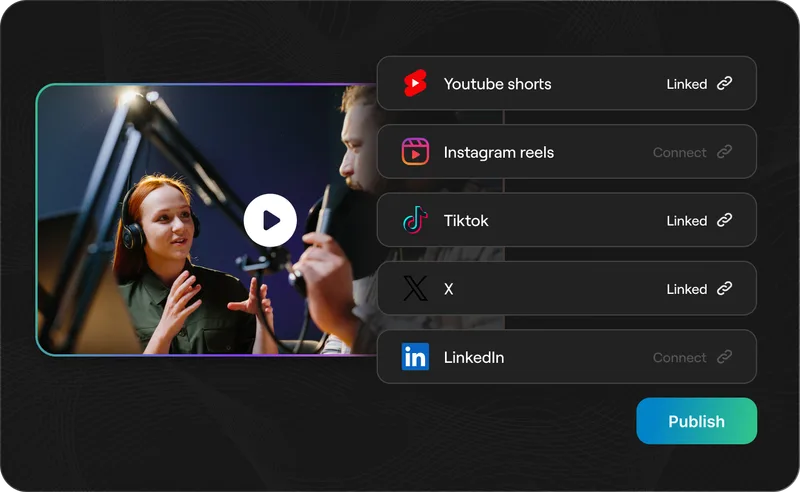
Someone has to watch the recording, find the good moments, cut the clip, add captions, reframe it for vertical, clean up the timing, export the file, write a caption, and repeat the whole process for YouTube Shorts, Instagram Reels, TikTok, LinkedIn, and every other channel the team cares about.
That is why AI clipping is becoming one of the most practical ways for teams to publish more short-form video without hiring more editors.
With the right AI video clipping workflow, one long video can become a full pipeline of Shorts, Reels, TikToks, and social clips. Instead of spending hours searching for moments, teams can start with AI-generated clips, review the best ones, make quick edits, and publish consistently.
The goal is not to replace creative judgment.
The goal is to remove the repetitive production work that keeps good content trapped inside long recordings.
Why teams struggle to publish short-form video consistently
Short-form video looks simple from the outside. A 45-second clip feels small compared with a 45-minute podcast or webinar.
But the workflow behind that clip is surprisingly heavy.
A team usually needs to:
- Watch the full recording
- Identify moments that can stand alone
- Trim each clip cleanly
- Add captions
- Reframe horizontal video into vertical
- Check speaker framing and text placement
- Export platform-ready versions
- Organize clips for review
- Publish across multiple channels
That is a lot of work for one short.
Now multiply it by five clips per week. Or ten. Or twenty.
This is where many teams hit the ceiling. They may have enough ideas, recordings, webinars, interviews, and customer stories, but they do not have enough editing capacity to turn that material into consistent short-form distribution.
The traditional answer is to hire a video editor, work with a video editing agency, or use outsourced video editing freelancers. Those options can help, but they also add cost, coordination, review cycles, and turnaround time.
AI clipping gives teams another path: use software to handle the first pass, then let humans approve, polish, and publish.
What is AI clipping?
AI clipping is the process of using artificial intelligence to turn long-form videos into short-form clips.
Instead of manually scrubbing through an entire video, an AI video clipping tool analyzes the recording and identifies moments that could work as standalone clips. A strong workflow can also add captions, reframe the video for vertical formats, trim around natural speech boundaries, and prepare clips for social publishing.
AI clipping is useful for:
- Podcasts
- Webinars
- YouTube videos
- Founder interviews
- Customer interviews
- Product demos
- Livestreams
- Coaching calls
- Online courses
- Tutorials and explainers
The best video clipping software does more than cut timestamps. It helps teams move from one long recording to multiple usable short-form assets.
That difference matters.
A basic video clipping tool might help you trim a file. A serious AI clipping workflow helps you find the clips, format them, caption them, review them, and publish them faster.
Why AI clipping is different from manual short-form video editing
Manual short-form video editing starts with human attention.
Someone has to watch the entire video and make dozens of small decisions before the team even has a clip to review. That can be valuable for high-end creative work, but it is slow for repeatable content operations.
AI clipping starts with automated discovery.
The tool scans the video and creates a first batch of possible clips. The team can then decide which clips are strong enough to publish, which need editing, and which should be ignored.
That changes the production model.
Manual workflow:
- Record one long video.
- Send it to an editor.
- Wait for clips.
- Review a few options.
- Request revisions.
- Publish when the final files are ready.
AI clipping workflow:
- Upload or paste one long video.
- Generate a batch of short-form clips.
- Review the strongest moments.
- Edit captions, crops, and timing.
- Export for Shorts, Reels, TikTok, and LinkedIn.
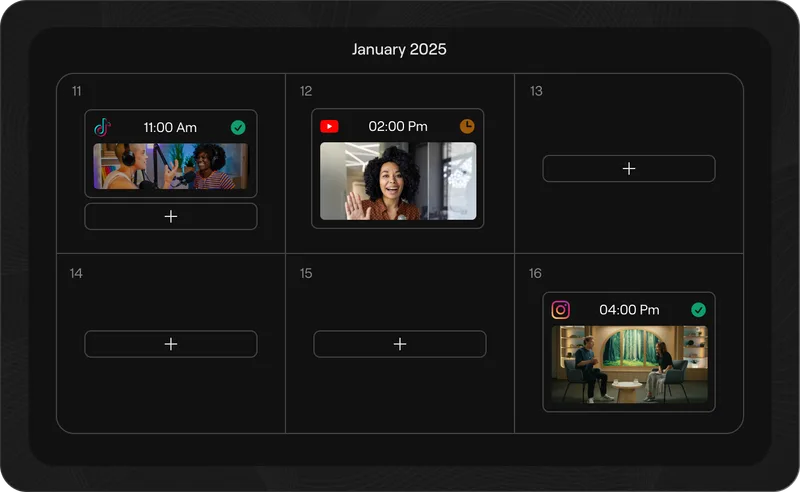
- Publish throughout the week.
The second workflow is faster because it turns editing into review and refinement instead of starting every clip from scratch.
AI Clipping vs Manual Short-Form Editing
AI clipping
Best for scale
5x
More clips from existing long-form content
1st
Draft handled by AI before team review
Fast
Captions, crops, and exports in one workflow
Manual editing
Best for craft
High
Control over pacing, story, motion, and brand polish
Slow
Every clip starts with human review and timeline work
Costly
Output usually scales with editor hours
| Category |
AI clipping |
Manual short-form editing |
|
01Speed
|
Much faster for first drafts. AI can scan a
podcast, webinar, or YouTube video and surface multiple clips
for review.
|
Slower by default. An editor has to watch,
choose, cut, caption, reframe, and export each clip manually.
|
|
02Volume
|
Built for output. One long video can become a
batch of Shorts, Reels, TikToks, and LinkedIn clips.
|
Limited by capacity. More clips usually means
more editor hours, more briefs, and more review cycles.
|
|
03Cost
|
Lower marginal cost. AI clipping is strongest
when teams already have long-form content and need repeatable
repurposing.
|
Higher marginal cost. Every extra clip adds
production time, whether handled in-house or through outsourced
video editing.
|
|
04Quality
|
Good for repeatable social clips. Best when
humans review the final hook, captions, crop, and pacing before
publishing.
|
Best for creative polish. Human editors still
win on custom storytelling, motion design, and campaign-level
creative direction.
|
|
05Workflow
|
One system for the repetitive work. Clip
detection, captions, vertical reframing, and exports can happen
in a single AI video clipping workflow.
|
More moving parts. Teams often juggle editing
timelines, caption tools, file handoffs, feedback, and export
versions.
|
|
06Best fit
|
Teams that want to repurpose video content, test more ideas,
and publish consistently without hiring more editors.
|
Teams that need bespoke creative, brand campaigns, detailed
narrative edits, or highly produced hero assets.
|
Recommended workflow
Use AI clipping for the first pass. Let AI find
moments, create short-form drafts, add captions, and reframe for
vertical. Then let your team approve, polish, and publish.
Simple rule
Use manual editing when every frame needs craft. Use AI clipping
when the team needs more Shorts from content it already recorded.
How AI clipping helps teams publish 5x more shorts
Publishing 5x more shorts does not mean working 5x harder.
It means turning every long-form asset into more distribution opportunities.
For example, a team might currently publish four short clips per month because that is all the editing calendar can handle. If each webinar, podcast, or YouTube video can produce five usable clips instead of one, the same team can move from four clips per month to twenty.
That is the real promise of AI clipping.
It helps teams increase output by changing the workflow, not by asking people to work nights and weekends.
Here is where the efficiency comes from.
1. AI finds usable moments faster
Finding the right moment is often the slowest part of clipping.
A strong clip needs a clear hook, a focused idea, enough context, and a natural ending. It should feel like a complete thought, not a random excerpt from the middle of a conversation.
AI video clipping helps by scanning the full video and surfacing moments that are more likely to work as shorts. The team still chooses what to publish, but it no longer has to start with a blank timeline.
This is especially useful for long videos with lots of spoken content, such as podcasts, webinars, and interviews.
2. Captions become part of the workflow
Short-form video is caption-first.
Many people watch without sound. Others use captions to follow faster. On platforms like TikTok, Reels, and YouTube Shorts, captions also help make the clip feel native to the feed.
A good AI shorts generator should include automatic captions as part of the workflow, not as a separate manual step.
Teams should be able to generate captions, edit the text, choose a style, and keep placement readable across vertical formats.
Captions are not just accessibility. They are part of retention.
3. Vertical reframing gets easier
Most business videos are recorded horizontally.
Most short-form platforms are vertical.
That mismatch creates a lot of manual work. Editors have to crop, pan, resize, and make sure the speaker's face, slides, screen share, and captions do not collide with platform UI.
AI clipping software can speed this up by reframing clips for 9:16 output and keeping the important visual subject in frame.
For teams repurposing YouTube videos, webinars, and podcasts, this is one of the biggest time savers.
4. One source video creates many assets
The highest-leverage content teams do not treat long-form videos as one-time assets.
They treat them as raw material.
A 45-minute webinar can become:
- Three educational Shorts
- Two LinkedIn clips
- One customer proof clip
- One product explainer
- One sales enablement video
- Several quote-based social posts
A podcast can become:
- A YouTube Short
- A TikTok clip
- An Instagram Reel
- A LinkedIn thought-leadership clip
- A newsletter section
- A blog intro
AI clipping makes this repurposing workflow more realistic because the first batch of clips can be generated quickly.
The team can then decide where each clip belongs.
5. Teams can test more ideas
Short-form video is not only a content format. It is a testing system.
When teams publish more clips, they learn which hooks, topics, speakers, examples, and formats get attention. That feedback can shape future webinars, podcasts, ads, landing pages, product messaging, and long-form videos.
Publishing one clip gives you one data point.
Publishing ten gives you a pattern.
This is why content repurposing AI is valuable beyond editing speed. It helps teams get more market signal from content they already created.
AI clipping vs hiring a video editor
AI clipping and human editing solve different jobs.
Hiring a short form video editor makes sense when the work needs strong creative direction, custom motion design, narrative editing, brand polish, or campaign-level storytelling.
AI clipping makes sense when the work is repeatable:
- Find highlights from a long recording
- Create short-form drafts
- Add captions
- Reframe for vertical
- Export multiple versions
- Prepare clips for review
In other words, AI clipping is not a replacement for every editor. It is a way to stop using expensive human time on the most repetitive parts of short-form production.
For many teams, the best model is hybrid.
Let AI generate the first pass. Let humans decide what is on-brand, what needs polishing, and what deserves to be published.
That workflow can reduce dependence on outsourced video editing while still keeping quality control in human hands.
AI clipping vs a video editing agency
A video editing agency can be useful when a team needs a managed creative service.
But agencies usually add an external production layer. That can mean briefs, queues, revisions, approvals, and delays. For some campaigns, that is worth it. For always-on short-form content, it can become too slow.
AI clipping gives teams more control over everyday publishing.
Instead of waiting for an agency to deliver a few clips, a team can generate options from every new recording and publish the strongest ones quickly.
That does not mean agencies disappear. Agencies can use AI video clipping too. The difference is that teams no longer need to outsource every basic clipping task just to maintain volume.
What to look for in video clipping software
Not every AI video clipping tool is built for team workflows.
Some tools are good for one-off clips. Others are better for creators. Teams need something that can support repeatable production across many videos, campaigns, and channels.
Look for video clipping software with:
- AI moment detection
- Automatic captions
- Caption editing and style controls
- Vertical reframing
- Export support for YouTube Shorts, TikTok, Reels, and LinkedIn
- Batch clip review
- Brand presets
- Editing controls for timing and crop
- Project organization
- Team review workflows
- API or automation support
The goal is not just to create clips. The goal is to build a repeatable short-form video system.
Best Content Types for AI Video Clipping
Great source videos already contain reusable moments.
The best candidates have clear speakers,
focused ideas, and natural sections
that can stand alone as Shorts, Reels, TikToks, LinkedIn clips,
sales assets, or help-center videos.
PO
Best fit
Podcasts
Podcasts naturally contain opinions, stories, debates, teaching
moments, and sharp guest insights that can stand alone as clips.
- Shorts
- Reels
- TikToks
- LinkedIn clips
WB
Campaign fuel
Webinars
Webinars often include education, demos, audience questions, and
expert commentary that can become a full post-event campaign.
- Event recaps
- Expert clips
- Demo moments
- Q&A clips
YT
Shorts engine
YouTube videos
Long YouTube videos can feed a YouTube Shorts generator workflow
through tutorials, interviews, explainers, reviews, and founder
videos.
- YouTube Shorts
- Topic clips
- Hooks
- Highlights
CI
Proof points
Customer interviews
Customer conversations often include proof, before-and-after
moments, objections, outcomes, and product value statements.
- Testimonials
- Sales clips
- Case study cuts
- Proof snippets
FX
Thought leadership
Founder and executive content
Founder-led content works when it feels direct, opinionated, and
timely. One recording session can turn into many short-form posts.
- Opinions
- Market takes
- Announcements
- LinkedIn clips
PD
Answer bank
Product demos and tutorials
Product videos contain small moments that answer specific questions
and can support social, help centers, sales follow-up, and
onboarding.
- How-to clips
- Help videos
- Sales follow-up
- Onboarding
1. Start with long-form
Use a podcast, webinar, interview, YouTube video, or demo.
2. Find moments
AI identifies standalone ideas, hooks, answers, and proof.
3. Format clips
Add captions, trim cleanly, and reframe for vertical feeds.
4. Publish everywhere
Send clips to Shorts, Reels, TikTok, LinkedIn, sales, or help.
A simple AI clipping workflow for teams
Here is a practical workflow any team can start with.
Step 1: Choose one strong long-form video
Start with a video that already has value.
Good options include a webinar with strong attendance, a podcast with a good guest, a customer interview, a YouTube video that performed well, or a product demo that answers common questions.
Step 2: Generate AI clips
Upload the video into an AI video clipping tool and generate short-form options.
At this stage, do not expect every clip to be perfect. The goal is to create a reviewable batch.
Step 3: Pick clips with clear standalone value
Choose clips that make sense without the full video.
A strong short should have:
- A hook in the first few seconds
- One focused idea
- Enough context
- A clear payoff
- A natural ending
Step 4: Edit captions and framing
Review caption accuracy, caption placement, speaker framing, and any awkward cuts.
This is where human judgment still matters. AI can generate the draft, but the team should make sure each clip feels intentional.
Step 5: Export for each platform
Create platform-ready versions for YouTube Shorts, Instagram Reels, TikTok, LinkedIn, or wherever your audience spends time.
The same idea can work across platforms, but captions, pacing, and framing should still feel native.
Step 6: Publish and measure
Track more than views.
Look at watch time, retention, saves, comments, shares, profile visits, link clicks, and downstream engagement. The goal is to learn which topics and formats deserve more investment.
How Reap helps teams scale AI clipping
Reap is built for teams that want to turn long videos into short-form clips faster.
With Reap, teams can use AI clipping to find moments from podcasts, webinars, YouTube videos, interviews, demos, and other long-form recordings. They can add captions, reframe videos for vertical formats, review clips, edit the output, and move toward publishing.
That makes Reap useful for:
- Marketing teams that need more short-form content
- Agencies producing clips for multiple clients
- Podcast teams turning episodes into social clips
- Founders and creators building a consistent publishing engine
- Sales and customer teams repurposing interviews and demos
- Developer and automation teams building repeatable video workflows
Reap is not only a video clipping tool. It is a fuller AI video editing workflow for teams that want to publish more without turning every clip into a manual editing project.
Start with Reap's AI video clipping tool, explore the AI video editor, or learn how teams can connect video workflows to agents with video MCP automation.
Reap is an AI clipping agent because it can connect clipping workflows to AI agents through MCP, API access, and agent-friendly docs. Instead of only using Reap manually as a video clipping tool, teams can work with agents like Claude Code, Codex, Cursor, and other MCP-capable tools to help run repeatable video workflows: create clips from a YouTube video or upload, apply caption presets, reframe for Shorts and Reels, check project status, retrieve finished clips, and prepare them for publishing. That agentic layer is what makes Reap different from a basic AI clipping tool. It is not just software that creates clips; it is a clipping system that AI agents can understand, call, and automate.
Final takeaway
Teams do not need to hire more editors every time they want to publish more short-form content.
They need a better system for turning long videos into useful clips.
AI clipping helps teams find strong moments, create Shorts and Reels faster, repurpose video content, reduce editing bottlenecks, and publish more consistently across social platforms.
The teams that win with short-form video are not always the teams that record the most.
They are the teams that make the most of what they already record.
Record once. Clip many times. Publish everywhere.
Start turning your long videos into short-form content with Reap’s AI clipping workflow. Upload a podcast, webinar, interview, or YouTube video, let Reap find the best moments, add captions, reframe for Shorts and Reels, and create publish-ready clips in minutes. Try Reap and build a faster, repeatable way to publish more short-form videos without hiring more editors.