You can now use Reap inside Codex as your AI clipping agent: cut clips, add captions, translate subtitles, and automate social video edits from a simple prompt.
Instead of opening a video editor, choosing settings, exporting files, and repeating the same steps for every podcast, webinar, interview, or YouTube link, you can ask Codex to run the workflow for you. Codex handles the instruction flow. Reap acts as the clipping agent and handles the video processing.
For creators, agencies, developers, and content teams, this changes the shape of video automation. You are not just using an AI video tool. You are giving your coding agent a video production skill, with Reap doing the actual clipping work behind the prompt.
Quick answer
Reap in Codex lets you use Codex to control Reap video workflows through prompts, with Reap acting as the AI clipping agent inside the workflow.
Once Reap is set up inside Codex, you can ask for outputs like:
- Cut 5 clips from this YouTube video
- Make each clip 30-45 seconds
- Find the best moments about specific topics
- Reframe the clips for TikTok, Reels, and YouTube Shorts
- Add captions and keyword highlights
- Translate subtitles into another language
- Create social-ready versions from long-form content
Reap does the clipping, captions, reframing, dubbing, translation, and export work. Codex helps turn your request into the right API-driven workflow.
Think of it this way:
- Codex is the operator. It understands your instruction, reads the Reap setup, and coordinates the workflow.
- Reap is the clipping agent. It analyzes the video, finds usable moments, creates clips, adds captions, and prepares the social-ready output.
- You are the reviewer. You approve what gets published, refine the prompt, and decide what matches your brand.
That split is what makes the setup practical. The agent does the repeatable production work, but the human still owns taste and publishing judgment.
Setup takes a minute
Here is the basic setup flow.
1. Copy and paste this into Codex
Start by asking Codex to create a Reap video skill.
Use Skill Creator to create a reap-video skill with npx skills add https://docs.reap.video
This gives Codex the Reap context it needs to understand the workflow: how clips are created, how captions work, how projects are tracked, and how Reap's API-driven video automation fits together.
If your Codex setup supports MCP, you can also connect the Reap docs through the Reap MCP server:
npx add-mcp https://docs.reap.video/mcp
The goal is the same either way: give Codex live Reap documentation so it can use the right endpoints, request fields, and workflow steps.
2. Create your Reap API key
Open Reap, go to Profile Settings, generate an API key.
Keep this key private. Treat it like any other production API credential. Do not paste it into public repos, shared docs, or client-facing notes.
3. Add it to your Codex setup
Paste the API key into your initial Codex prompt and ask Codex to add them to the Reap skill configuration.
A good setup prompt looks like this:
Here is my Reap API key. Add them to the Reap skill configuration for this project. Store the secret safely, use it only for Reap API requests, and confirm once the skill is ready.
After that, you can ask Codex for video outputs in normal language.
Then ask Codex for the video output
Once setup is done, the workflow becomes much simpler.
You do not need to remember every endpoint, field, or export setting. You can describe the output you want.
Example prompts
Use Reap to cut 5 clips from this YouTube link about AI video editing. Make each clip 30-45 seconds.
Find the best moments about [xyz topics], reframe them for TikTok, and add captions.
Translate the captions on this video into Spanish and export a social-ready version.
Create 8 clips from this webinar. Focus on the product demo, customer questions, and pricing objections. Export portrait clips with captions.
Take this podcast episode, find the strongest founder advice moments, make them 45-60 seconds, add captions, and prepare them for Shorts.
That is the point of Reap x Codex. The interface becomes the instruction.
Reap is now your clipping agent
Most AI video tools still behave like destinations. You open the app, upload a file, click through settings, wait for clips, review them, export them, and then move the files somewhere else.
Reap inside Codex works more like a clipping agent.
You give Codex the instruction:
Find the 6 best moments from this interview, make them 30-60 seconds, add captions, reframe for Shorts, and return the finished clips.
Codex translates that request into the workflow. Reap runs the video process.
That means Reap is not just waiting for you to press buttons. It can become the video execution layer inside a larger agent workflow:
- Clip this podcast
- Caption these highlights
- Reframe the best moments
- Translate the subtitles
- Create a dubbed version
- Return the outputs for review
For content teams, that is the important shift. A clipping agent does not just generate clips once. It gives your team a repeatable way to turn long-form video into short-form output from the same prompt pattern every week.
For developers, it means Reap can sit inside a product workflow, internal dashboard, or automation script as the agentic video layer. Codex can help wire the system together. Reap handles the media-specific work that would be expensive and slow to build from scratch.
Why Reap works as a clipping agent
A basic clipping tool cuts a long video into shorter pieces.
A clipping agent needs to understand more of the short-form workflow.
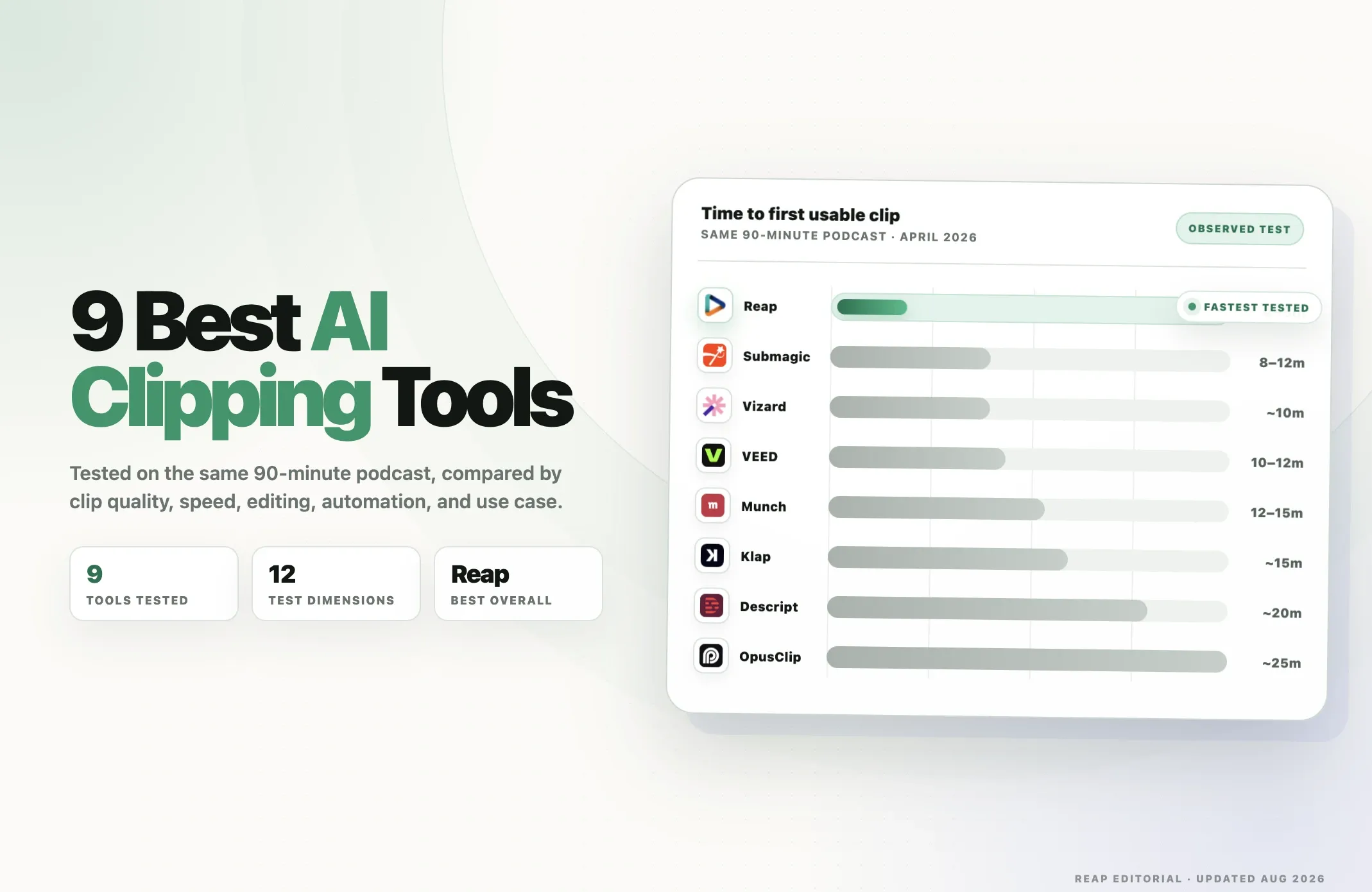
That is where Reap fits. In the 2026 Reap clipping report, the category is framed around a simple shift: the best AI clipping tools no longer just "cut" videos. They detect strong moments, generate captions, reframe content for vertical platforms, and help teams scale output without sacrificing review and control.
Reap is built for that fuller workflow.
Inside Codex, Reap can act as the execution layer for:
| Clipping agent capability | What Reap does inside Codex |
|---|---|
| Moment selection | Finds strong clips from long-form videos like podcasts, webinars, interviews, and YouTube content. |
| Captions | Adds captions, highlights, and subtitle workflows for social-ready clips. |
| Reframing | Formats videos for portrait, square, or landscape outputs across Shorts, Reels, TikTok, and LinkedIn. |
| Localization | Supports translated subtitles and dubbing workflows for multilingual repurposing. |
| Post-clip editing | Keeps clips editable through Reap’s short-form editor, captions, B-roll, voiceover, branding, and visual controls. |
| Publishing workflow | Helps teams move from clip generation toward review, scheduling, and distribution. |
| Automation | Supports API and MCP-driven workflows so Codex can coordinate repeatable video jobs. |
This is the key difference.
If a tool only returns raw clips, Codex still has to help you stitch together captions, reframing, translation, exports, and review somewhere else. Reap brings those video-specific steps into one workflow, which makes it much more useful as the clipping agent behind a prompt.
That also makes Reap more valuable for global content. The report highlights Reap's multilingual caption and dubbing workflows because short-form distribution is no longer limited to one language or one platform. When one strong clip can become a captioned, reframed, translated, or dubbed version for another audience, the clipping agent is doing more than trimming video. It is helping the team repurpose the asset.
What happens behind the prompt
The prompt feels simple, but there is a real workflow behind it.
When you ask Codex to use Reap, Codex can help turn your instruction into a structured Reap workflow:
- Read the Reap skill or MCP docs.
- Identify the right Reap workflow for your request.
- Send the source video or YouTube URL to Reap.
- Create the clipping, caption, dubbing, translation, or reframe job.
- Track the project status.
- Retrieve the finished clips or output URLs.
- Hand those outputs back to you or pass them into the next system.
Reap is doing the video work. Codex is coordinating the steps.
That distinction matters. Codex is not trying to become a video editor. It is giving you a prompt-based way to control Reap's video automation. Reap becomes the clipping agent your prompt can call.
What you can create with Reap inside Codex
Reap inside Codex is most useful for repeatable social video workflows.
| Workflow | What you ask Codex | What Reap handles |
|---|---|---|
| Long video to clips | "Cut 5 clips from this YouTube link" | AI clipping and clip generation |
| Captioned Shorts | "Add captions and export portrait clips" | Captions, highlights, and vertical exports |
| Topic-based clipping | "Find moments about pricing and customer objections" | AI moment selection guided by topics |
| Multilingual subtitles | "Translate captions into Spanish" | Subtitle translation workflow |
| Dubbing | "Create a dubbed version in French" | AI voice dubbing and sync |
| Reframing | "Reframe this for TikTok and Reels" | Portrait, landscape, or square output |
| Batch workflows | "Process these 10 videos with the same settings" | Repeatable video automation |
This is the difference between a tool and an agentic workflow. A tool waits for clicks. A clipping agent can be called by a prompt, API workflow, internal app, or automation script.
This is especially useful when the source content is already valuable but too long for social distribution.
Good fits include:
- Podcasts
- Interviews
- Webinars
- Founder videos
- Product demos
- Courses
- Customer calls
- Event recordings
- YouTube videos
If your team already creates long-form content, Reap x Codex helps turn that content into short-form output without rebuilding the workflow every time.
Why this is different from a normal video editor
A normal video editor is built around manual control.
That is still useful. There will always be cases where a human editor needs frame-level precision, taste, timing, and creative judgment.
Reap x Codex is built for a different job: repeatable video automation.
Instead of asking someone to:
- Watch the full recording
- Find candidate moments
- Cut each clip
- Add captions
- Reframe for vertical
- Export versions
- Rename files
- Track which outputs are done
you can ask Codex to run the workflow through Reap.
The human still reviews the clips. The human still decides what gets posted. The human still owns the brand, message, and final call.
But the repetitive production steps move into a system.
Why creators and agencies should care
Creators and agencies usually do not have a content idea problem. They have a throughput problem.
A podcast episode can become 10 clips. A webinar can become a week of LinkedIn posts. A course module can become a set of Shorts. An interview can become clips in multiple languages.
The problem is the work between the source video and the finished post.
Reap x Codex helps reduce that gap.
For a solo creator, that means fewer late-night editing sessions.
For an agency, it means a more repeatable client workflow.
For a marketing team, it means long-form content can move into short-form distribution faster.
For a developer, it means Reap's video automation can be added to an internal tool, dashboard, or app without building clipping, captions, dubbing, and reframing from scratch.
Why developers should care
For developers, Reap x Codex is less about making one clip and more about building a pipeline.
Codex can help you:
- Add Reap to an existing backend
- Create a script that processes video URLs
- Build a webhook receiver for completed projects
- Save output URLs to a database
- Add Reap actions to an internal dashboard
- Debug failed API requests
- Generate examples in Node, Python, or your stack of choice
This is where Reap MCP matters. When Codex can read the current Reap API docs, it can build with the actual workflow instead of guessing.
That makes the developer experience more practical. You can ask for the thing you want, then review the code, run it, and iterate.
A practical first workflow
If you are trying Reap x Codex for the first time, keep the first request small.
Start with one source video and one output format.
Try this:
Use Reap to create 5 clips from this YouTube URL.Make each clip 30-45 seconds, export in portrait format, add captions, and return the finished clip URLs when processing is done.
Then try a more specific version:
Use Reap to find clips from this webinar about onboarding, activation, and customer retention. Make each clip 45-60 seconds, add captions, and reframe them for LinkedIn and YouTube Shorts.
Once that works, you can turn it into a repeatable workflow:
Build a reusable script that accepts a list of YouTube URLs, sends each one to Reap, creates 5 portrait clips with captions, waits for completion, and writes the clip titles and URLs to a CSV.
That is where the workflow becomes more than a demo. It becomes something a team can run every week.
What to review before publishing
Automation should speed up production, not remove judgment.
Before publishing Reap-generated outputs, review:
- Clip selection
- Caption accuracy
- Names, product terms, and technical terms
- Hook quality
- Brand tone
- Translated subtitles
- Dubbed audio quality
- Platform fit
- Rights to use the source video
This is especially important for client work, regulated industries, multilingual content, and executive-facing clips.
Use Reap x Codex to remove repetitive work. Keep humans in the loop for taste, accuracy, and approval.
Reap x Codex in one sentence
Reap x Codex lets you ask for video outputs in plain language, while Codex handles the instruction flow and Reap handles the video processing.
That is the shift.
The video workflow becomes promptable. The setup takes a minute. The output can be clips, captions, translated subtitles, dubbed videos, reframed Shorts, or a repeatable automation pipeline.
For teams turning long-form content into short-form distribution, that is a much better way to work.
Start using Reap inside Codex
Turn Codex into your video workflow operator and let Reap handle the clipping, captions, reframing, translation, and social-ready exports.
Set up Reap in Codex, paste your video link, and ask for the clips you need.